
History Lesson: What Is a .tga File? TARGA Images Windows Photos Won't Open
Truevision’s TARGA raster — not a JPG. Game textures and video stills Windows Photos often skip.
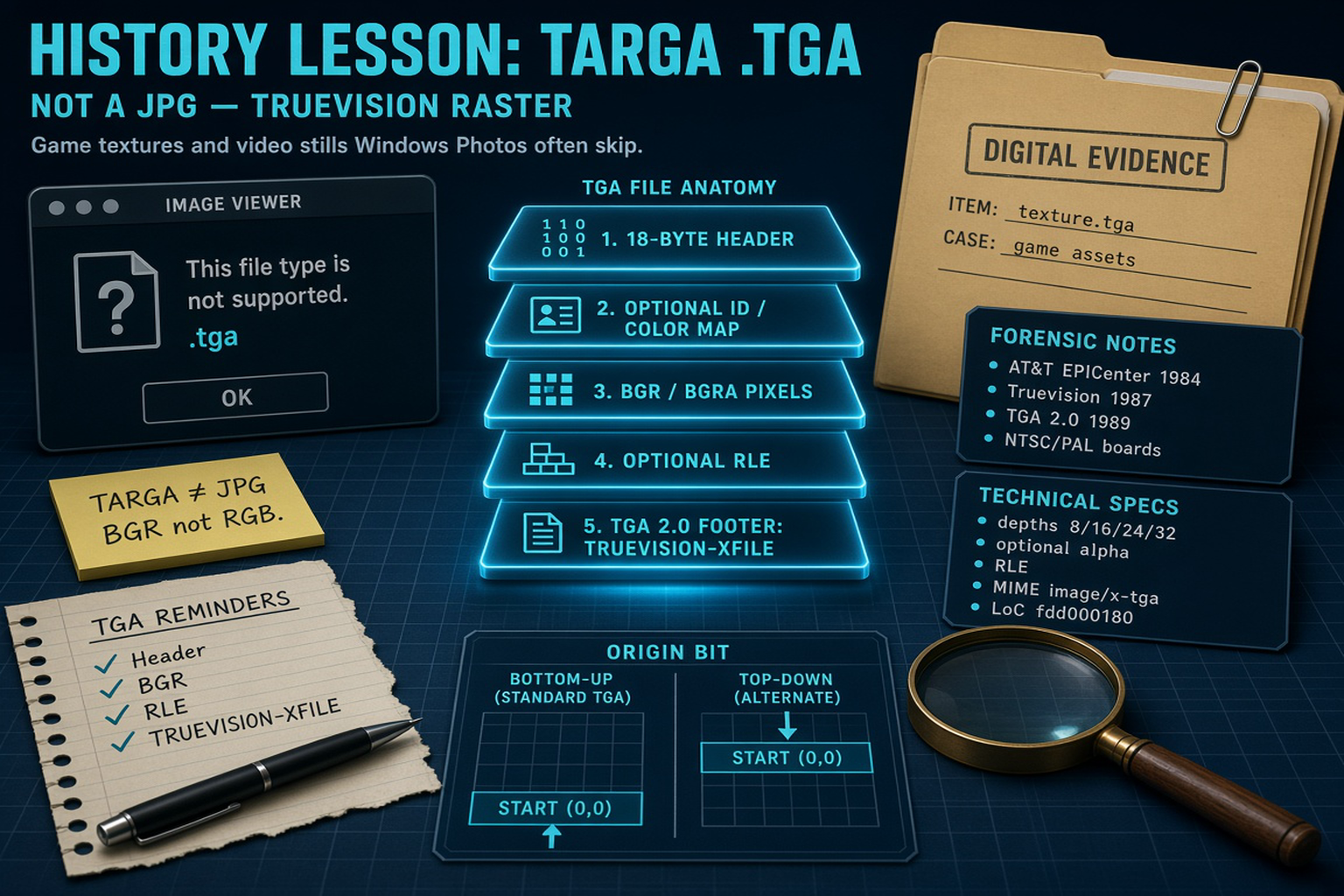
TL;DR
A .tga file is a Truevision TARGA raster image — often 24-bit or 32-bit with optional alpha — from the AT&T EPICenter / Truevision lineage. People say TARGA; the usual extension is .tga. It is not a JPG. Windows Photos and everyday viewers often will not open game textures and video stills stored this way. Legacy File Converter converts .tga to JPG, PNG, or PDF offline on this PC.
What is a .tga file?
The TGA / TARGA raster format originated at AT&T EPICenter — the Electronic Photography and Imaging Center — with feedback from Island Graphics Inc. in 1984. Early board-specific cousins used extensions such as .vda (video display adapter) and .icb (image capture board). The format was codified by Brad Pillow and Bryan Hunt at EPICenter after Alan Wlasuk, Pillow, and Island’s Steven Dompier pushed for something less tied to one card.
In 1987, a leveraged employee buyout formed Truevision, Inc. in Indianapolis, with about 29 former EPICenter employees. TARGA expands to Truevision Advanced Raster Graphics Adapter; TGA to Truevision Graphics Adapter. The file was the native still format of Truevision TARGA and VISTA boards — early IBM PC high-color / true-color videographics cards aimed at professional image synthesis and video, commonly at NTSC (National Television System Committee) and PAL (Phase Alternating Line) video sizes.
TGA 2.0 arrived in 1989, authored by Truevision’s Shawn Steiner with direction from Kevin Friedly and David Spoelstra. Version 2 added postage-stamp thumbnails, alpha guidance, gamma, textual metadata, an extension area, and a footer — designed so older readers could ignore the new parts. Corporate ownership later moved under RasterOps (acquisition often dated 1992), then Pinnacle Systems (1999), and later became associated with Avid Technology. The Library of Congress notes that the TGA specification was proprietary and became harder to find after Pinnacle. LoC’s format description is fdd000180 (Truevision TGA version 2.0); PRONOM often lists fmt/402 for TGA 2.0. MIME types commonly seen are image/x-tga / image/x-targa (not IANA-registered). Classic Mac type code TPIC; UTI com.truevision.tga-image. Related extensions include .tga, .icb, .vda, and .vst.
Why it spread: a fixed header plus packed pixels was simpler than early TIFF for true-color interchange. Uncompressed 24-bit TGA is roughly an 18-byte header plus packed RGB/BGR data — simpler than BMP row padding or TIFF/PNG containers. Optional lossless RLE (run-length encoding), similar in spirit to PackBits, favors icons and cartoons more than photos. 32-bit TGA with alpha was common for overlays and keying (character generators). Animation, video stills, and later game textures / 3D assets kept the extension alive.
TARGA ≠ JPG
A JPG is DCT-compressed photographic delivery. A .tga is a Truevision raster (header + packed pixels, optional RLE and alpha). Renaming .tga to .jpg does not convert it.
Why won’t Windows Photos open a .tga?
Everyday Windows viewers optimize for camera-roll and web formats. A .tga from a texture pack or older video workstation is a different professional raster — often 32-bit with alpha, sometimes RLE-compressed, sometimes bottom-up origin. Double-clicking in Windows Photos frequently yields a generic icon or “format not supported,” not a broken JPG.
File Explorer preview for TGA is not built-in the same way as JPG or PNG. TGA sits among the formats that need a dedicated preview handler — see The Image Formats Windows Explorer Won’t Preview — But We Will. Own the confusion: TGA ≠ JPG, and TARGA is the product/acronym people say while .tga is the file.
How the bytes work (18-byte header, BGR, RLE, TRUEVISION-XFILE)
A classic TGA starts with an 18-byte little-endian header: ID length (1), color map type (1), image type (1), color map specification (5), and image specification (10 — X/Y origin, width, height, pixel depth, image descriptor). Image types include 0 (none), 1/9 (color-mapped), 2/10 (true-color), and 3/11 (grayscale), with RLE on 9/10/11. Practical bit depths are 8, 15, 16, 24, and 32 (16-bit often carries 1-bit alpha; 32-bit typically 8-bit alpha).
Pixel order is often BGR (and BGRA), not RGB — a frequent source of channel-swapped previews. The image descriptor stores alpha depth in the low bits; bit 5 selects top-to-bottom versus the classic bottom-to-top origin. After the header come an optional image ID, an optional color map, then the image data.
TGA 2.0 may end with an optional 26-byte footer: extension offset (4), developer directory offset (4), then the signature TRUEVISION-XFILE (16 ASCII characters) plus a period and a NUL. That signature distinguishes New TGA (2.0) from Original TGA. When present, the extension area size field is 495 bytes and can hold author, comments, gamma, postage-stamp offset, and related metadata.
Origin bit and RLE scan lines
Default TGA origin is bottom-up; the descriptor bit can flip to top-down, which inverts images in naive viewers. Older guides allowed RLE packets to cross scan lines; TGA 2.0 says they should not — readers should tolerate cross-line packets; writers should not create them.
Why .tga files still sit on disks in 2026
In 2026 these legacy files still appear in game texture pipelines, 3D asset packs, animation and video stills, and older Windows/Mac archives. They are not broken JPGs — they are an older professional raster that never became a default Photos format. Explorer blank icons are a preview-handler gap, not proof the pixels are gone — again covered in The Image Formats Windows Explorer Won’t Preview — But We Will.
You do not need the original Truevision board software just to see what is inside. Legacy File Converter lists Targa / .tga among supported images on Supported File Types and converts .tga to JPG, PNG, or PDF offline on this PC — nothing is uploaded.
Related reading
Ready to open your old files?
Start free, then unlock unlimited conversions with a one-time $79.95 Standard license. Download the Windows installer — full features for up to 10 files.
Free trial
Full app features · up to 10 files
Windows 10 or 11
Free trial — convert up to 10 files. Download the Windows installer and convert locally on your PC.
Direct Windows installer · offline MSI
Is this safe? — publisher, installer, and SmartScreen help
Requires Windows 10 or 11. No subscriptions.