
History Lesson: What Is a .jp2 File? Not the Same as a JPG
JPEG 2000’s Part 1 container — wavelet-based, not classic JPG. Most browsers still will not open it.
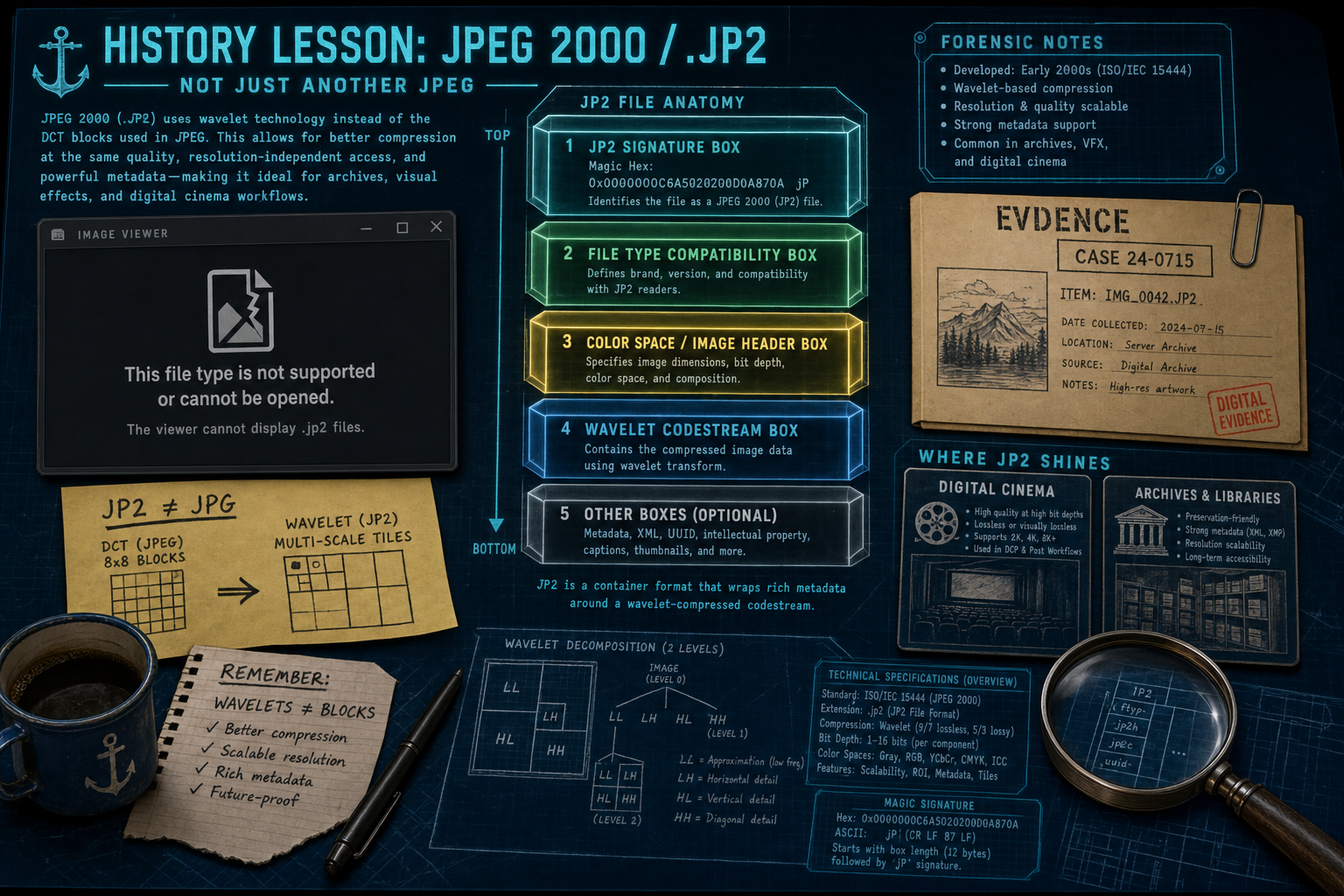
TL;DR
A .jp2 file is JPEG 2000’s Part 1 image container (ISO/IEC 15444) — a wavelet-based format, not classic JPG. Everyday browsers and Windows Photos often will not open it. Archives, digital cinema, and medical workflows still produce these legacy files. Legacy File Converter converts .jp2 to JPG, PNG, or PDF offline on this PC.
What is a .jp2 file?
JPEG 2000 is the image coding system from the Joint Photographic Experts Group — formally ISO/IEC JTC 1/SC 29/WG 1, developed jointly with ITU-T. The core coding system is ISO/IEC 15444-1 (also ITU-T T.800). The JPEG committee’s site lists the original Part 1 edition as published in 2001; related histories also place Part 1’s birth in 2000. Part 1 defines both the codestream syntax and a basic file format called JP2, which carries metadata such as color space and intellectual-property rights with the compressed image.
A .jp2 file is that JP2 container. Inside it, the pixels are coded with a Discrete Wavelet Transform (DWT) — not the Discrete Cosine Transform (DCT) used by classic JPEG (ISO/IEC 10918, usually .jpg / .jpeg). JPEG 2000’s block coder is often described as Embedded Block Coding with Optimal Truncation (EBCOT), which supports progressive quality layers and scalable decoding from one bitstream. Own the confusion: JPEG ≠ JPEG 2000, and .jp2 ≠ .jpg.
JP2 ≠ JPG
A classic JPG is DCT-compressed delivery photo. A .jp2 is JPEG 2000’s Part 1 container around a wavelet codestream. Renaming the extension does not change the bytes.
Why won’t my browser open JPEG 2000?
On the open web, JPEG 2000 never became a default HTML image format. Chromium and Firefox discussions repeatedly treated new codecs as a cost in binary size, memory, and security surface — and saw low web prevalence. Safari / WebKit historically decoded JPEG 2000, then removed built-in support (WebKit bug 178758 / related PRs), leaving opt-in paths for some native clients rather than everyday browsing.
That chicken-and-egg problem started early. JPEG 2000 needed new decoder code, more memory than many 2000-era PCs had spare, and was not backward-compatible with classic JPEG. Camera makers and websites waited for broad support that never arrived for consumer sharing. By the time patents and tooling matured, newer web formats had taken the “better than JPEG for the web” slot. Result in 2026: a .jp2 from an archive or scanner often shows a generic icon or “format not supported” in Windows Photos — see also The Image Formats Windows Explorer Won’t Preview — But We Will.
How the bytes work (JP2 boxes and wavelets)
A well-formed JP2 file begins with a fixed JPEG 2000 Signature box. The first twelve bytes are the hex sequence 00 00 00 0C 6A 50 20 20 0D 0A 87 0A — a length of 12, type jP\040\040 (“jP” plus two spaces), then the four-byte content CR LF 0x87 LF. That odd content was designed to detect files mangled by text-mode transfer. After the signature come other boxes (file type, header, color space, contiguous codestream, optional XML / UUID metadata).
The compressed image itself is the JPEG 2000 codestream. Bare codestreams (often seen as .j2c / .j2k in cinema and tooling) can exist without the JP2 wrapper. JPX (Part 2) extends JP2; Motion JPEG 2000 (Part 3) wraps sequences of independent frames. Treat those cousins as related standards — this lesson focuses on the .jp2 files people still find on disks.
Codestream vs container
JP2 is the Part 1 file format (boxes + metadata). The wavelet-coded pixels live in the codestream. A raw .j2c/.j2k may be valid JPEG 2000 image data without being a .jp2.
Where JPEG 2000 won — and why .jp2 files still sit on disks
Digital Cinema Initiatives (DCI), formed in March 2002 by major Hollywood studios, selected JPEG 2000 for digital cinema distribution. Theatrical Digital Cinema Packages carry lossy JPEG 2000 picture essence (high bit depth, no chroma subsampling in the DCI model) so one package can serve 2K and 4K projection from scalable coding.
In medicine, DICOM defines Transfer Syntaxes for JPEG 2000 Image Compression, including lossless-only (1.2.840.10008.1.2.4.90) and lossy-or-lossless (1.2.840.10008.1.2.4.91) modes based on ISO/IEC 15444-1. Libraries and archives also favor wavelet coding: the Library of Congress Recommended Formats Statement lists JPEG2000 (.jp2) among preferred formats for digital photographs and notes that Discrete Wavelet Transform (DWT) is preferred to Discrete Cosine Transform (DCT) when compression is used.
So in 2026 these legacy files still sit in cultural-heritage repositories, geospatial and document-imaging exports, medical handoffs, and cinema-adjacent workstations — places that valued lossless mode, scalability, or high bit depth more than browser ubiquity. They are not broken JPGs; they are a different standard that never won the consumer desktop.
You do not need a specialty viewer just to see what is inside a .jp2. For the practical how-to, see JPEG 2000 (.jp2) Files That Won't Open. Legacy File Converter converts .jp2 to JPG, PNG, or PDF offline on this PC.
Related reading
Ready to open your old files?
Start free, then unlock unlimited conversions with a one-time $79.95 Standard license. Download the Windows installer — full features for up to 10 files.
Free trial
Full app features · up to 10 files
Windows 10 or 11
Same free trial as always — download the Windows installer and convert locally on your PC.
Direct Windows installer · offline MSI
Is this safe? — publisher, installer, and SmartScreen help
Requires Windows 10 or 11. No subscriptions. 100% Windows Native.