
Open any old file. Convert it to a modern format.
WordPerfect, Lotus 1-2-3, HEIC, XPS, and more — convert documents, spreadsheets, presentations, and images on your PC.
- Converts locally — your files never leave your PC
- Whole folder trees, several formats in one pass
- One-time from $79.95 — no subscription
Free Windows trial on PC · 10 files
Free trial · 10 files · Standard from $79.95, one-time
See all features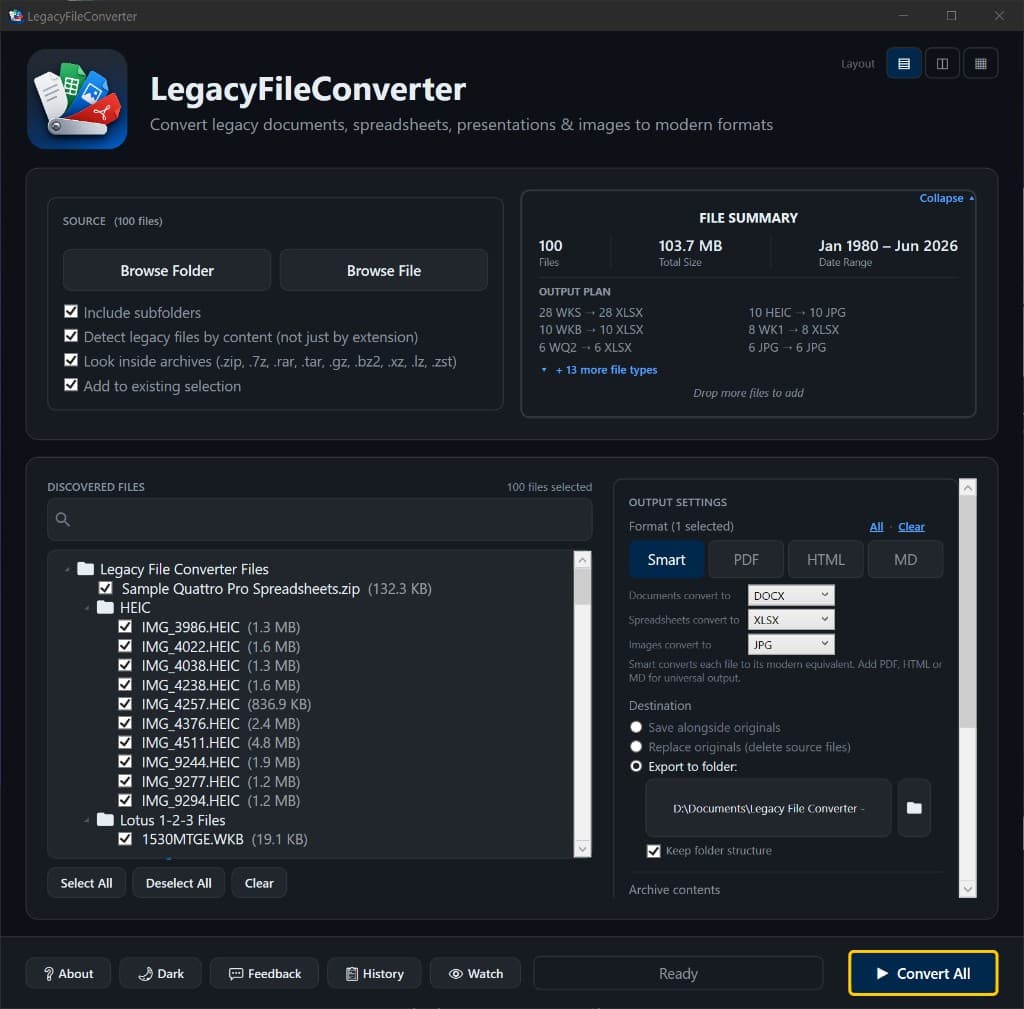
100+ formats
Documents, sheets, slides, images
No original app
WordPerfect, Lotus, Works, and more
Batch & Explorer
Folders + right-click convert
Plus library
Search, tags, and local previews
Built for files that should stay private
Legal records, medical scans, financial statements, family photos — these don't belong on someone else's server. Legacy File Converter never uploads anything, so your files never leave your machine.
- 100% local — works with no internet connection
- Right-click any file or folder in Windows Explorer
- Batch-convert thousands of files in one pass
- Watch a folder and auto-convert new files
Three steps to a modern file
No learning curve, no settings to wrestle with — just point, pick, and convert.
Drop in your files
Drag a single file or an entire folder, or right-click any legacy file in Explorer and choose Convert.
Pick a modern format
The app recognizes the file family and suggests the right target — or send everything to a universal PDF, Markdown, or HTML.
Convert offline
Everything runs on your PC. No uploads, no cloud, no account, and no original application required.
The problem
A file you can't open is a file you've effectively lost
Decades of documents, spreadsheets, and photos have outlived the software that made them. Legacy File Converter brings them back to life — without the headaches.
Windows just won't open it
Double-click a .wpd, .xps, .qpw, .heic, or .psd and you get an error, a blank window, or a wall of formatting codes. The data is fine — Windows simply has no app for it.
The original software is gone
WordPerfect, Lotus 1-2-3, Quattro Pro, and Microsoft Works are discontinued. Tracking down a copy that installs on Windows 11 is a losing battle.
Online converters want your files
Free web tools make you upload private documents to a stranger's server, cap how many files you can do, and watermark the results.
Dozens of legacy formats, bucketed to modern equivalents
Legacy File Converter recognizes each file's family and sends it to the right modern format — or convert anything to a universal PDF, Markdown, or HTML.
Documents
DOCX · PDF · RTF · ODT · TXT · MD · HTML
- WordPerfect (.wpd)
- Word (.doc/.docx)
- Microsoft Works (.wps)
- Microsoft XPS (.xps/.oxps)
- Lotus Word Pro (.lwp)
- Hangul (.hwp)
- StarWriter (.sdw)
Spreadsheets
XLSX · PDF · CSV · MD · HTML
- Lotus 1-2-3 (.123/.wk*)
- Quattro Pro (.qpw/.wb*)
- Excel (.xls/.xlsx)
- dBASE (.dbf)
- SYLK (.slk)
- OpenDocument (.ods)
Presentations
PPTX · PDF · HTML
- PowerPoint (.ppt/.pptx)
- OpenDocument (.odp)
- StarImpress (.sxi)
- Slideshows (.pps)
Images
JPG · PNG · PDF · TIFF · WEBP
- iPhone Photos (.heic/.heif)
- TIFF scans (.tif/.tiff)
- Photoshop (.psd)
- AVIF (.avif)
- Targa (.tga)
- JPEG 2000 (.jp2)
…and many more. If you have an old file and don't know what it is, Legacy File Converter can usually figure it out from the contents.
You converted the files. Now search them.
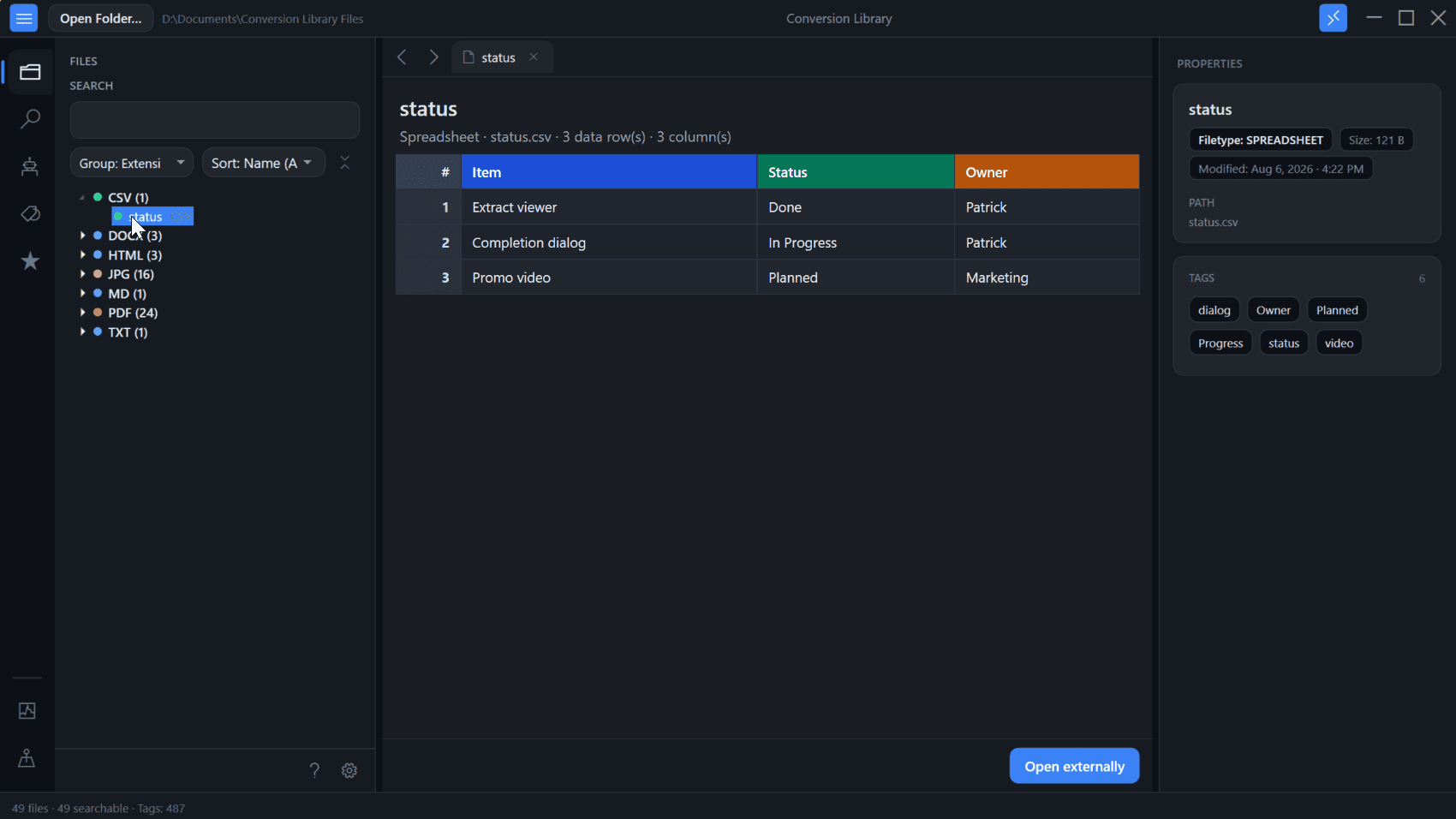
Standard converts WordPerfect, Lotus, Works, Quattro Pro, Ami Pro, HEIC, and 100+ formats locally on this PC. Plus unlocks Conversion Library — search converted files, add tags and knowledge maps, and open previews. Same installer. Unlock with a Plus key. Nothing is uploaded.
- Full-text search across converted documents, spreadsheets, presentations, and images on this PC
- Tags and knowledge maps for related files
- Built-in previews — Word, PDF, Excel, photos, and more
Plus add-on $29.95 if you already have Standard. Standard + Plus from the start is $109.90.
Simple, Transparent Pricing
One-time purchase. No subscriptions. No hidden fees.
Start with the full-feature trial — test up to 10 files locally.
Standard
one-time · personal use
- Lifetime access with free updates for version 6.x
- Unlimited conversions
- 100+ formats (WordPerfect, Lotus, images, and more)
- Bulk & folder processing
- Runs locally — nothing uploaded
Will you need to search these files later?
Buy Standard — $79.95Already have Standard? Add Plus ($29.95)
Frequently asked questions
Do I need the original program installed?
No. Legacy File Converter has its own conversion engine built in, so you do not need WordPerfect, Lotus, Quattro Pro, Works, Photoshop, or any vintage software on your PC.
Are my files uploaded anywhere?
Never. Every conversion happens locally on your computer. The app works on an air-gapped machine with no internet connection at all.
How much does it cost?
Standard is a one-time $79.95 for personal use, or $999 per seat for commercial use. Plus (Conversion Library) is $29.95 personal / included in the $109.90 Standard + Plus bundle — or $1299 per seat commercial. No subscriptions — try free first, full features for up to 10 files.
What is the difference between personal and commercial licensing?
Standard and Plus are the product names. Personal licensing ($79.95 for Standard) is for individual / non-commercial use. Commercial licensing ($999 per seat for Standard) is for business use and includes priority support, invoice/PO options, and volume pricing for teams.
Which versions of Windows are supported?
Windows 10 and Windows 11 (64-bit). A Mac, Linux, or mobile version is not available.
What is Conversion Library Plus?
You converted the mixed archive. Plus is how you find it again. Standard converts WordPerfect, Lotus, Works, Quattro Pro, Ami Pro, HEIC, and 100+ formats locally on your PC. Plus unlocks Conversion Library — local search, previews, Photo Map, EXIF tags, bookmarks, knowledge maps, and review packs. Same installer; unlock with a Plus key ($29.95 add-on, or $109.90 for Standard + Plus). Nothing is uploaded. Windows desktop only. Learn more about Conversion Library.
Is the license a subscription, or do I keep the app?
It is a one-time purchase, not a subscription. You keep using the app forever, and Standard includes free updates for version 6.x — no renewal fees.
Can I use it on my phone or Mac?
No — it is a Windows 10/11 desktop app. On a phone, we'll email you the download link for your PC.
Ready to rescue your old files?
One-time Standard from $79.95. Free 10-file Windows trial on PC.