
History Lesson: What Is a .slk File? SYLK Symbolic Link Spreadsheet
Microsoft’s ASCII spreadsheet interchange from Multiplan — not a filesystem symlink, and not binary BIFF.
TL;DR
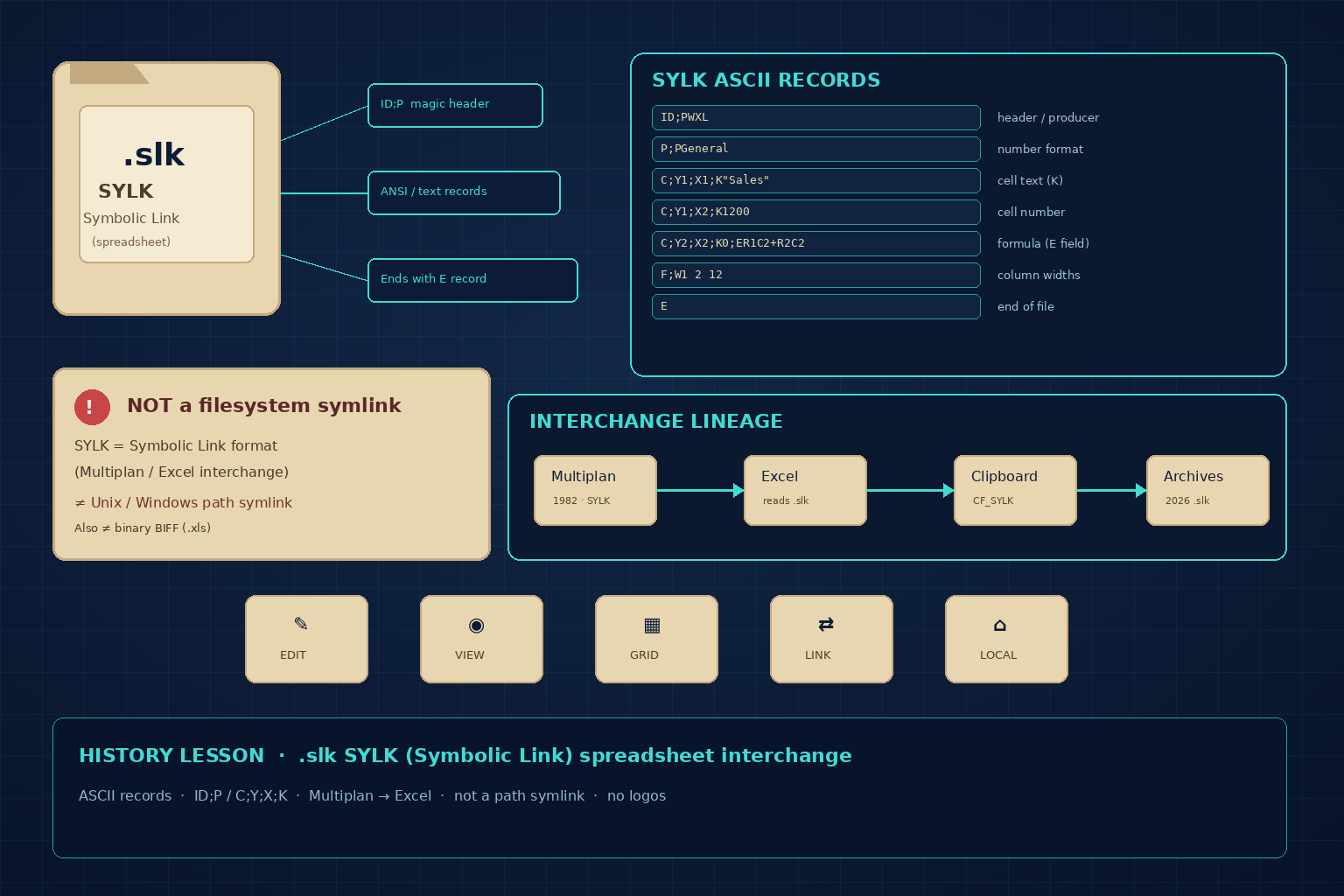
A .slk file is Microsoft SYLK (Symbolic Link) — a text-based spreadsheet interchange format from Multiplan (early 1980s), later supported by Excel and other spreadsheets. It is not a filesystem symlink, and it is not binary BIFF .xls. Files are ANSI/ASCII records (for example ID;P, C;Y…;X…;K…, ending in E). Legacy File Converter converts .slk locally on Windows — nothing is uploaded. See /file-types and local conversion without CloudConvert.
What is a .slk file?
SYLK stands for Symbolic Link — Microsoft’s spreadsheet interchange format, conventionally saved with the .slk extension. Wikipedia and the Encyclopedia of Graphics File Formats (FileFormat.info) describe it as an ASCII/ANSI stream meant to move worksheet data between applications such as Microsoft Multiplan and Excel, not as a native binary workbook. Microsoft has never published a complete public SYLK specification; the closest widely cited Microsoft-authored summary is sylksum.doc (author MCK, updates through October 1986).
Multiplan shipped in August 1982 (Wikipedia). The 1982 Multiplan manuals already document Symbolic / SYLK transfer: worksheets could be saved and loaded as readable records so other programs (and languages such as BASIC or Pascal on contemporary systems) could exchange data. Raymond Chen’s *Old New Thing* note on clipboard formats CF_SYLK and CF_DIF ties SYLK to Multiplan the same way DIF is tied to VisiCalc — interchange formats that outlived the apps that popularized them.
Structurally, a SYLK file is a sequence of records. Each record starts with a type code, then semicolon-delimited fields. Every valid file begins with an ID record (often ID;P plus a producer token such as MP for Multiplan or values used by Excel such as WXL / XL in community documentation) and ends with a lone E (end-of-file) record. C records describe cells: Y and X are one-based row and column, K holds a raw value (quoted text or a number), and an E *field* on a C record holds an expression/formula. F and P records carry formatting; B can declare dimensions. Semicolons inside string data are escaped by doubling (;;). The format is not Unicode — Excel and peers write the system ANSI code page — and lines that Excel accepts are historically capped around 260 characters.
Readable on purpose
Open a typical .slk in Notepad and you will see ID / C / F / E lines — unlike a binary .xls. That text layout is why SYLK spread as an interchange format between spreadsheets, databases, and custom tools in the Multiplan era.
SYLK “Symbolic Link” vs a filesystem symlink
The name Symbolic Link confuses people in 2026. In Unix and modern Windows, a symbolic link (symlink) is a filesystem object that points one path at another. SYLK is unrelated: it is a spreadsheet data format. Format registries such as Just Solve the File Format Problem state that explicitly. If someone sent you a .slk, they almost always meant a worksheet export — not an mklink shortcut.
A second mix-up is with CSV and Excel. Because SYLK files must start with the characters ID, a CSV whose first cell is the unquoted header ID can make Excel complain that the file looks like SYLK (Microsoft Knowledge Base / community “SYLK: File format is not valid” threads). That error is about Excel’s sniffing of the opening bytes — not proof your CSV is a real SYLK sheet. Conversely, a genuine .slk is still often associated with Excel on Windows even though the content is text records, not BIFF.
Not binary BIFF
Classic Excel .xls files are binary (often compound/OLE storage with BIFF records). SYLK is a different lineage: ANSI text records for interchange. Do not rename .slk to .xls and expect a clean open.
Why .slk files still show up in 2026
Public write-ups describe SYLK as largely frozen since 1986 and obsolete for new authoring — yet the files keep appearing. Excel retained Open/Save support for .slk across many Windows versions; Windows still lists CF_SYLK as a standard clipboard format; and LibreOffice / other suites historically import variants. Shared drives, email archives, scientific and finance exports, and game/mod tooling that adopted the format all leave .slk behind when the creating app is long gone.
If you only need values, some people re-save through a modern spreadsheet. For legacy files sitting next to old .xls, .dbf, or Lotus sheets, a dedicated local converter is often safer than hunting for Multiplan or fighting Excel’s format warnings. Legacy File Converter converts .slk on this PC to modern targets such as XLSX or CSV — see the curated list on /file-types. Nothing is uploaded; compare that approach with converting legacy files without CloudConvert.
Related reading
Ready to open your old files?
Start free, then unlock unlimited conversions with a one-time $79.95 Standard license. Download the Windows installer — full features for up to 10 files.
Free trial
Full app features · up to 10 files
Windows 10 or 11
Free trial — convert up to 10 files. Download the Windows installer and convert locally on your PC.
Direct Windows installer · offline MSI
Is this safe? — publisher, installer, and SmartScreen help
Requires Windows 10 or 11. No subscriptions.