
History Lesson: What Is a .dbf File? Excel Will Not Open dBASE Tables
A self-describing dBASE / xBase table. Not a shapefile by itself — and modern Excel often will not open it cleanly.
TL;DR
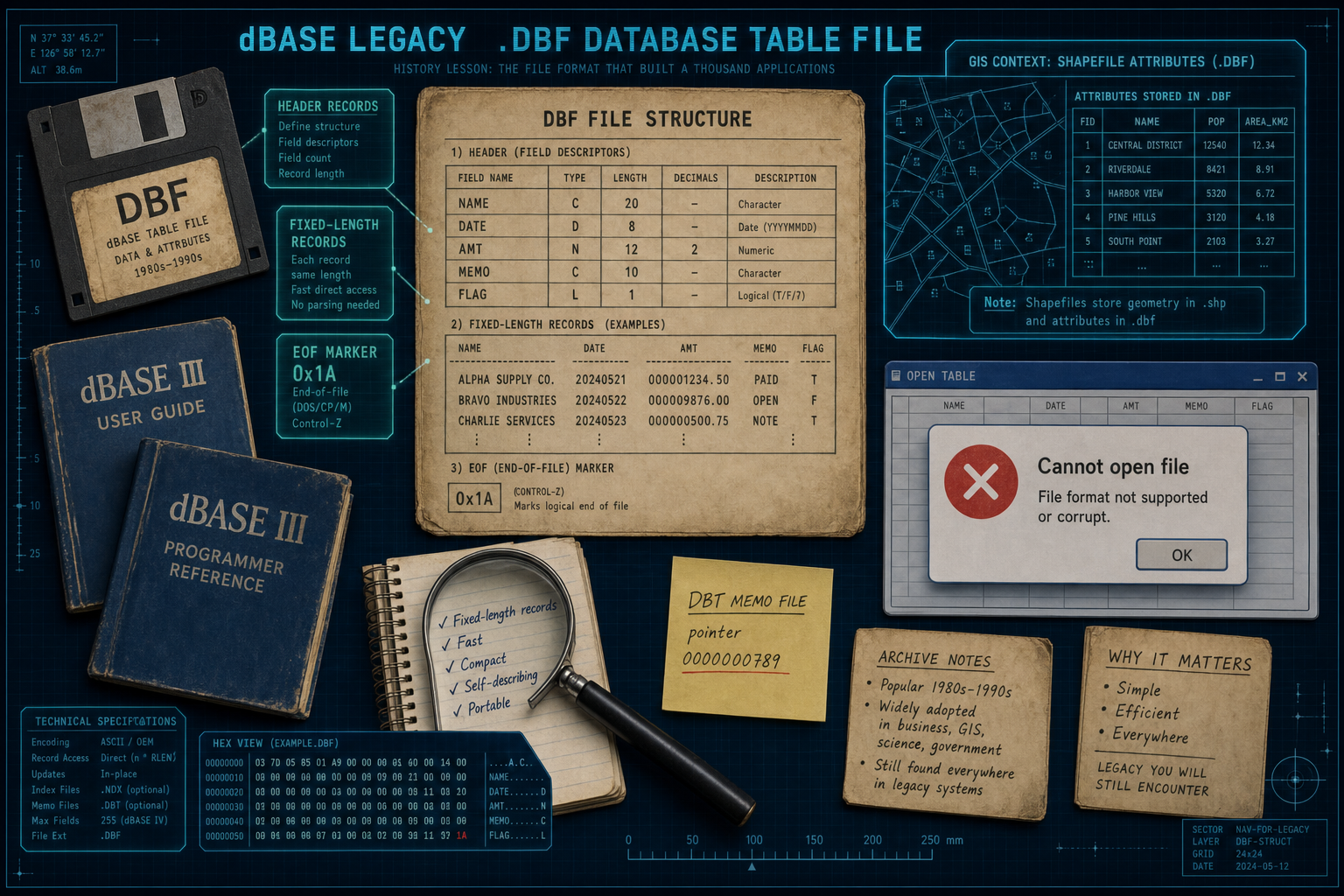
A .dbf file is a dBASE / xBase table: a self-describing header plus fixed-length records. Companions include .dbt memo files. GIS shapefiles reuse .dbf for attributes beside .shp / .shx. Modern Excel often will not open classic .dbf cleanly. Legacy File Converter converts to XLSX or CSV on this PC.
What is a .dbf file?
C. Wayne Ratliff built Vulcan in 1978, inspired by JPLDIS at NASA’s Jet Propulsion Laboratory. Ashton-Tate licensed and marketed it as dBASE II — the “II” was marketing, not a true second version. Ported to IBM PC DOS, it became a bestseller. dBASE III arrived mid-1984 (May/June 1984 sources differ on the exact ship week). dBASE III+ in December 1985 introduced the “modern” III+ file layout still widely seen on disks today.
By 1985, PC Magazine described .dbf as a de facto standard that other software already expected to read (Wikipedia’s .dbf article citing that magazine coverage). The format is self-describing: a program can learn field names and types from the file header itself — the Library of Congress format description FDD000325 documents that pattern.
Shapefile .dbf vs standalone dBASE table
If you also see .shp and .shx beside the .dbf, you are looking at GIS attributes for an ESRI shapefile — not necessarily a lone office database you open by itself.
Why won't Excel open my .dbf file?
Older Excel builds could open many .dbf tables through File → Open with the dBase Files filter — community documentation from the Excel 2007 / 2010 era still describes that path. On newer Excel, double-click or File → Open often fails: users report Trust Center / File Block errors, “format not supported,” and ESRI .dbf files that opened in Excel 2010 but not Excel 2016 (Microsoft Answers threads). That is not one clean “Excel deleted DBF forever” year — it is a messy drop in reliability.
Access 2013 famously dropped dBASE import and link; Microsoft later restored dBASE support in Access for Microsoft 365 / later Access builds — Access 2013 was the broken year on that side of Office. Product stance for spreadsheet work today matches the existing how-to: modern Excel often will not open classic .dbf cleanly, so convert locally to XLSX or CSV.
How the bytes work (header, records, memos)
The header carries a version byte, a last-update stamp as YYMMDD, a record count, header length, and record length, then a run of 32-byte field descriptors — classic levels keep names to about 10 characters, with types such as C / D / F / L / M / N — terminated by 0x0D. Programs read that map before they touch a single data row.
Each record starts with a delete flag: 0x20 (space) means active; 0x2A (asterisk) means deleted. Fields are packed with no separators between columns. The file ends with 0x1A, the end-of-file marker. Memo (and some binary) fields store only a 10-digit block number as text in the .dbf; the long text lives in a companion .dbt memo file. Lose the .dbt and memo columns go empty or broken.
Variants pile up: FoxBASE+ / dBASE III+, dBASE IV, Visual FoxPro (often version byte 0x30), and more. xBase is the name for the clone family — FoxPro, Clipper, Harbour, and kin — that kept the table idea alive after Ashton-Tate’s product line changed hands.
Why these files still sit on disks in 2026
Ashton-Tate sued Fox; in December 1990 a federal court dismissed the case and invalidated Ashton-Tate’s dBASE copyrights for not disclosing the JPLDIS public-domain basis (the later Borland deal / DOJ path required ending that suit). The format outlived the company fights. Borland bought Ashton-Tate in 1991. Microsoft bought Fox in 1992 and evolved FoxPro into Visual FoxPro (later discontinued). Through all of that, the .dbf table remained the exchange unit.
In 2026 the same extension still turns up as GIS shapefile attributes, old POS / business apps, FoxPro-era line-of-business tables, and estate or office archives — legacy files that outlasted the apps that wrote them. LibreOffice / OpenOffice Calc can read and write many generic .dbf files; that does not mean every Excel install will.
Legacy File Converter converts .dbf to XLSX or CSV offline on this PC. For the practical how-to, see Opening dBASE (.dbf) Database Files as Spreadsheets.
Convert your files
Related reading
Ready to open your old files?
Start free, then unlock unlimited conversions with a one-time $79.95 Standard license. Download the Windows installer — full features for up to 10 files.
Free trial
Full app features · up to 10 files
Windows 10 or 11
Same free trial as always — download the Windows installer and convert locally on your PC.
Direct Windows installer · offline MSI
Is this safe? — publisher, installer, and SmartScreen help
Requires Windows 10 or 11. No subscriptions. 100% Windows Native.