
History Lesson: What Is a .xls File? Not the Same as .xlsx
Binary Excel workbook from the Excel 5.0/95 and Excel 97–2003 eras — not Office Open XML .xlsx; modern Excel may File Block older ones.
TL;DR
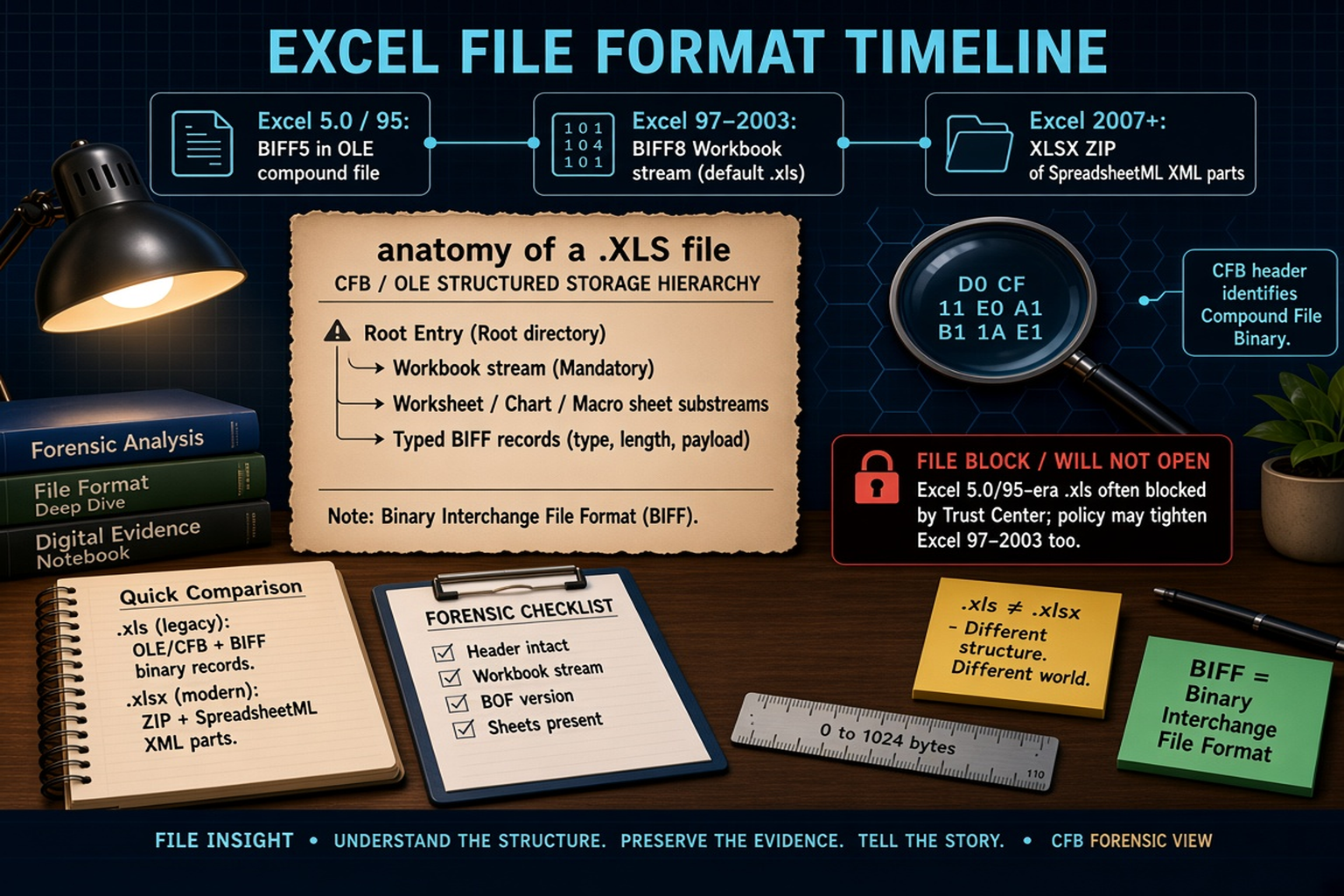
A .xls file is Microsoft Excel’s older binary workbook — often an OLE / CFB compound file with BIFF records from the Excel 97–2003 era — not a .xlsx ZIP of XML. The same extension also covers earlier Excel 5.0 / Excel 95 binaries. Modern Excel may File Block older ones. For the practical how-to, see When an .xls File Is Too Old for Modern Excel. Legacy File Converter converts .xls to XLSX, CSV, or PDF offline on this PC.
What is a .xls file?
.xls is Microsoft Excel’s classic workbook extension. Excel first shipped for Macintosh on 30 September 1985; Windows Excel followed in 1987 (Excel 2.x), succeeding Microsoft’s earlier Multiplan spreadsheet. That long product run left more than one binary under the same .xls suffix.
From Excel 5.0 (1993-era BIFF5) onward, the workbook’s BIFF (Binary Interchange File Format) stream lives inside an OLE (Object Linking and Embedding) Compound File Binary (CFB) / structured-storage container. Microsoft’s format docs also cover BIFF7 (Excel 95) and BIFF8 (Excel 97 through Excel 2003; still offered later as a compatibility save). The classic default .xls of the Excel 97–2003 era is BIFF8 inside that CFB — the world Library of Congress notes such as FDD000510 and Microsoft [MS-XLS] / [MS-CFB] describe. Starting with Excel 2007, the default save format became Office Open XML .xlsx. Binary .xls remained as a compatibility path, not the default.
Same extension, different eras
A file ending in .xls might be Excel 5.0/95 (BIFF5/BIFF7), Excel 97–2003 (BIFF8), or even a non-Excel file with the wrong extension. Microsoft’s supported-formats list still distinguishes “Excel 5.0/95 Binary” from “Excel 97–Excel 2003 Binary,” both using .xls. The suffix alone does not tell you which binary world you are in.
Is a .xls file the same as a .xlsx?
No. Classic Excel 97–2003 .xls is a binary OLE / CFB compound file: a miniature file system of storages and streams holding typed BIFF records. .xlsx is Office Open XML: a ZIP / OPC package of SpreadsheetML XML parts (ISO/IEC 29500 / ECMA-376) — not the same bytes as .xls. Peeking at a real .xlsx often shows ZIP magic `PK 03 04`. Renaming .xls to .xlsx does not convert it.
.xls ≠ .xlsx
Different structure. Different world. A CFB + BIFF binary and an Office Open XML ZIP are not interchangeable by renaming the extension.
How the binary format is put together (CFB / OLE + BIFF)
A CFB file commonly begins with an eight-byte header signature: `D0 CF 11 E0 A1 B1 1A E1` (Microsoft [MS-CFB] / Library of Congress FDD000510). That signature identifies Compound File Binary structured storage — the container around the Excel workbook stream.
A BIFF8 .xls must contain a Workbook stream with a Globals substream and at least one sheet substream (worksheet, chart, macro, or dialog). Those streams are series of typed binary records (type, length, payload). BOF (Beginning of File) records mark the start of a substream and identify the BIFF version — for example, Microsoft’s BIFF8 examples use version field `0x0600`, and BOF record type `0x0809` is a common landmark in that era.
Why does modern Excel block some old .xls files?
Modern Excel Trust Center File Block can refuse or restrict older binary types. Excel 95 workbooks, Excel 4 / 3 / 2 worksheets and macrosheets, and — depending on policy — even Excel 97–2003 binaries may be blocked or limited. Users can review Open checks under File → Options → Trust Center → File Block Settings. Group Policy / security baselines may force broader blocks than the defaults.
Not every .xls is blocked. Soften that myth: distinguish Excel 5.0/95-era defaults from Excel 97–2003, then check policy. Macro and legacy-binary history is why File Block exists. Keep security settings intact and convert when you need a trusted modern copy.
File Block ≠ corrupt file
A blocked Excel 5.0/95-era .xls is often intact and untrusted by policy — not proof the workbook is empty or damaged. For the practical path around Trust Center edits, see the how-to linked below.
Why .xls legacy files still show up in 2026
Decades of business, legal, and personal archives still hold .xls. “Save as Excel 97–2003 Workbook,” exports from other tools, email attachments, and backups keep copies moving. The same extension can hide BIFF5 vs BIFF8 — another reason real conversion matters more than renaming.
These legacy files are not automatically broken. They are older Excel binaries waiting for a format that current Excel trusts. For the practical how-to, see When an .xls File Is Too Old for Modern Excel. Legacy File Converter converts .xls to XLSX, CSV, or PDF offline on this PC.
Related reading
Ready to open your old files?
Start free, then unlock unlimited conversions with a one-time $79.95 Standard license. Download the Windows installer — full features for up to 10 files.
Free trial
Full app features · up to 10 files
Windows 10 or 11
Same free trial as always — download the Windows installer and convert locally on your PC.
Direct Windows installer · offline MSI
Is this safe? — publisher, installer, and SmartScreen help
Requires Windows 10 or 11. No subscriptions. 100% Windows Native.