
History Lesson: What Is a .doc File? Not the Same as .docx
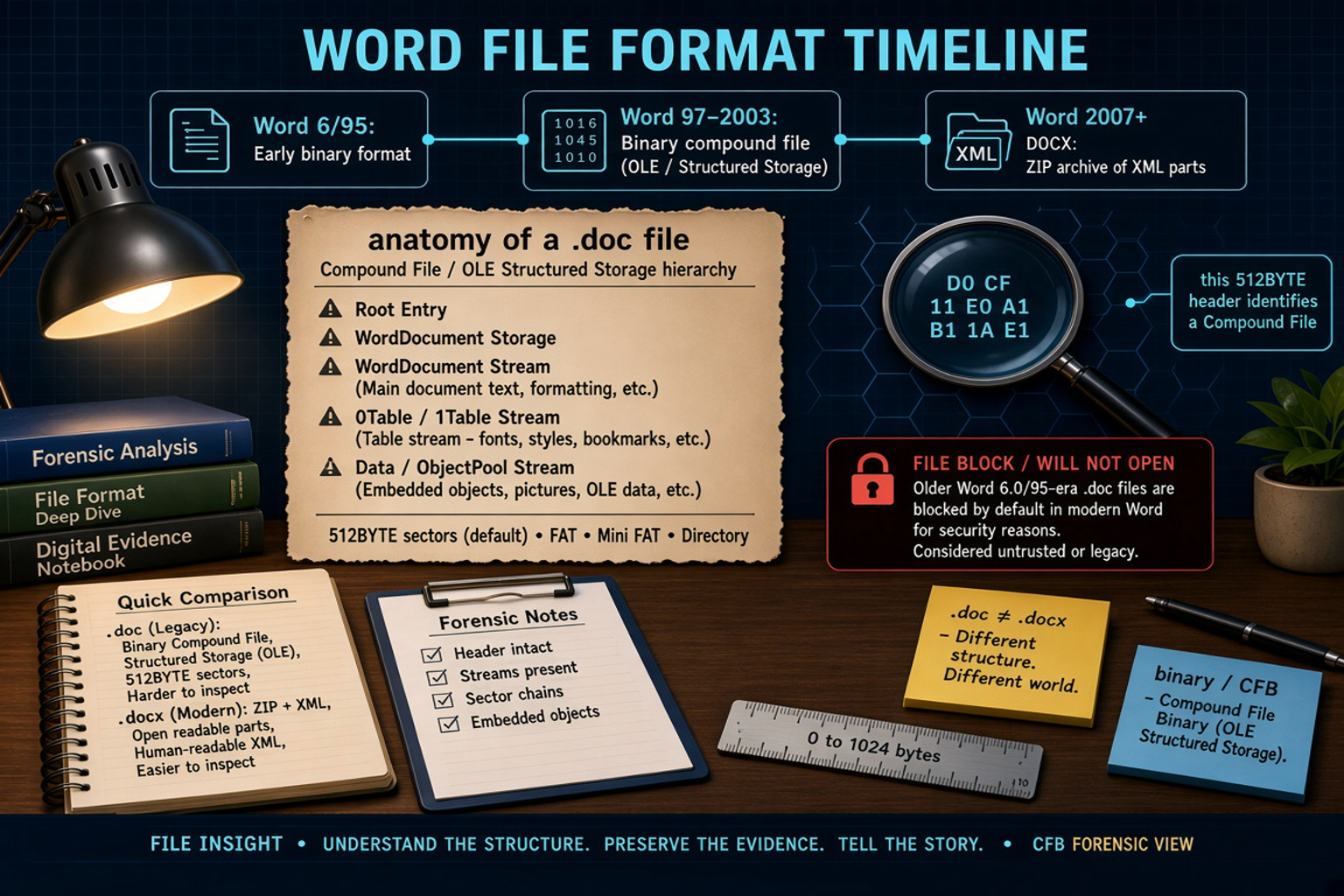
Binary Word document from the Word 6/95 and Word 97–2003 eras — not Office Open XML .docx; modern Word may File Block older ones.
TL;DR
A .doc file is Microsoft Word’s older binary document — often an OLE / CFB compound file from the Word 97–2003 era — not a .docx ZIP of XML. The same extension also covered earlier binaries (including Word 6.0 / Word 95). Modern Word may File Block older ones. For the practical how-to, see When an Old .doc File Won't Open in Modern Word. Legacy File Converter converts .doc / .dot to DOCX or PDF offline on this PC.
What is a .doc file?
.doc is Microsoft Word’s long-running document extension. That single suffix hid several incompatible binary eras. Word for MS-DOS had its own DOC format. Early Word for Windows 1.0 / 2.0 (and related early Mac Word) used an earlier binary structure. Word 6.0 and Word 95 (Word 7) introduced a new native binary based on OLE2 Compound Document Format — the era catalogued as PRONOM fmt/39 (Microsoft Word Document 6.0/95).
Word 97 through Word 2003 revised that OLE / CFB-based binary again. The format stayed through Word 2000 / 2002 / 2003 — the classic “Word 97–2003” binary .doc preserved in Library of Congress notes such as FDD000509. Starting with Word 2007, the default save format became Office Open XML .docx. Binary .doc remained as a compatibility save/open path, not the default.
Same extension, different eras
A file ending in .doc might be Word 6/95, Word 97–2003, or even a non-Word file with the wrong extension. The suffix alone does not tell you which binary world you are in.
Why isn’t a .doc the same as a .docx?
Classic Word 97–2003 .doc is a binary OLE (Object Linking and Embedding) / CFB (Compound File Binary) compound file: a miniature file system of storages and streams inside one file. .docx is OOXML (Office Open XML): a ZIP package under OPC (Open Packaging Conventions) of XML parts (WordprocessingML), not a CFB. Peeking at a real .docx often shows ZIP magic `PK 03 04`. Renaming .doc to .docx does not convert it.
ECMA-376 standardized the OOXML family in December 2006. ISO/IEC 29500 was published in November 2008 after April 2008 approval. Binary Office formats stayed closed for years; Sun/OpenOffice reverse-engineered them. Microsoft published the Word 97–2007 binary .doc specification under the Open Specification Promise around February 15, 2008. Specs have been updated since (notes through May 2022) — the first published PDF was not a complete map of every feature.
.doc ≠ .docx
Different structure. Different world. A CFB binary and an OOXML ZIP are not interchangeable by renaming the extension.
How the binary format is put together (CFB / OLE streams)
A CFB file commonly begins with an eight-byte header signature: `D0 CF 11 E0 A1 B1 1A E1` (Library of Congress FDD000509 / Microsoft MS-CFB). Gary Kessler notes the beginning resembles “DOCFILE.” Default layout uses 512-byte sectors with FAT, Mini FAT, and a directory — a tiny structured-storage volume inside the file.
Inside a Word binary DOC, the mandatory `WordDocument` stream holds main document text and formatting. A table stream is named `0Table` or `1Table` (fonts, styles, bookmarks, and related structures). Embedded OLE objects live under ObjectPool in the Data stream. The WordDocument stream often starts near offset 512 with FIB (File Information Block) identifiers; LOC notes commonly observed wIdent `ECA5` and version-ish `C100` in the FibBase.nFib family — useful forensic landmarks, not a universal magic number for every Word era.
Why modern Word blocks some old .doc files
Modern Word Trust Center File Block can refuse older binary types. Opening of Word 6.0 and Word 95 binary documents and templates is blocked by default in current Word / Microsoft 365. Word 97+ binaries are often still openable unless policy tightens further. Users can clear Open checks under File → Options → Trust Center → File Block Settings. Group Policy / security baselines may force the block — and some organizations block more broadly than the defaults.
Not every .doc is blocked. Soften that myth: distinguish Word 6.0/95 defaults from Word 97–2003, then check policy. Newer Microsoft 365 builds have also tightened legacy binary handling. Macro / ActiveX history is why File Block exists: binary .doc can carry macros and OLE objects; .docx packaging changed the attack surface. Keep security settings intact and convert when you need a trusted modern copy.
File Block ≠ corrupt file
A blocked Word 6.0/95 .doc is often intact and untrusted by policy — not proof the document is empty or damaged. For the practical path around Trust Center edits, see the how-to linked below.
Why .doc legacy files still show up in 2026
Decades of business, legal, and personal archives still hold .doc. Scanners, older export tools, and “Save as Word 97–2003 Document” still emit the binary format. Email attachments and backups keep copies moving. The same extension can hide Word 6/95, Word 97–2003, or even mislabeled non-Word files — another reason real conversion matters more than renaming.
These legacy files are not automatically broken. They are older Word binaries waiting for a format that current Word trusts. For the practical how-to, see When an Old .doc File Won't Open in Modern Word. Legacy File Converter converts .doc / .dot to DOCX or PDF offline on this PC.
Related reading
Ready to open your old files?
Start free, then unlock unlimited conversions with a one-time $79.95 Standard license. Download the Windows installer — full features for up to 10 files.
Free trial
Full app features · up to 10 files
Windows 10 or 11
Same free trial as always — download the Windows installer and convert locally on your PC.
Direct Windows installer · offline MSI
Is this safe? — publisher, installer, and SmartScreen help
Requires Windows 10 or 11. No subscriptions. 100% Windows Native.