
History Lesson: What Is a .sdw File? StarWriter vs OpenDocument
StarOffice Writer’s binary document — not .sxw, and not OpenDocument .odt.
TL;DR
A .sdw is a StarWriter / StarOffice Writer binary document (MIME application/vnd.stardivision.writer) from the StarOffice ~3.x–5.x era. It is not OpenOffice.org XML .sxw, and not OpenDocument Text .odt. Modern Microsoft Word will not open it. Legacy File Converter converts .sdw locally on Windows to modern targets such as DOCX and PDF — nothing is uploaded.
What is a .sdw file?
A .sdw file is a word-processing document from StarWriter, the writer that shipped inside StarOffice during the suite’s binary era (roughly StarOffice 3.x–5.x). The Internet media type is application/vnd.stardivision.writer. Just Solve / Archiveteam’s StarOffice binary-formats notes point at UK National Archives PRONOM records fmt/812, fmt/813, and x-fmt/400 for related StarOffice Writer binaries. The same binary family also includes .sdc (Calc), .sdd (Impress), .sda (Draw), .vor templates, and siblings — this article is about Writer .sdw only.
The line starts in 1985. Marco Börries wrote StarWriter 1.0 for the Zilog Z80 and formed Star Division in Lüneburg the following year (Wikipedia StarOffice; OpenOffice.org brief history). The product was ported to the Amstrad CPC (CP/M), then the Amstrad PC-1512 / MS-DOS, and grew into the StarOffice suite for MS-DOS, OS/2, and Windows, marketed primarily in Europe. Star Division was later based in Hamburg, and contemporary U.S. coverage also described a Fremont, California headquarters after the company moved stateside (LA Times / NYT).
Until about version 4.2, StarOffice rested on the StarView C++ class library (Wikipedia). In 1998, Star Division began offering StarOffice for free. In August 1999, Sun Microsystems acquired Star Division; CNET (Stephen Shankland, November 1999) reported the terms from an SEC filing, covering Star Division plus the related Star Company. Sun released most of the source as OpenOffice.org around 2000; later StarOffice builds were snapshots of OOo plus proprietary bits. Oracle acquired Sun in January 2010; the product briefly became Oracle Open Office, was discontinued in 2011, and the OpenOffice.org line continued on a community / Apache path while LibreOffice had already forked earlier from OOo.
.sdw ≠ .sxw ≠ .odt
Binary StarWriter (.sdw) is not the later OpenOffice.org XML package (.sxw), and neither is OpenDocument Text (.odt). Renaming the extension does not convert the file.
Is a .sdw the same as .sxw or .odt?
No — and that confusion is why these legacy files keep landing in “what is this?” searches. StarOffice 5.2 (released about 20 June 2000) was the last major line still rooted in the old binary suite era and the first major Sun release (Wikipedia version table). StarOffice 6.0 (about May 2002, based on OpenOffice.org 1.0) moved Writer to a ZIP+XML package with the .sxw extension — OpenOffice.org XML, not the old compound binary. Later, OpenDocument Text (.odt) became the open-standard path (StarOffice 8 era / OpenOffice.org 2.x).
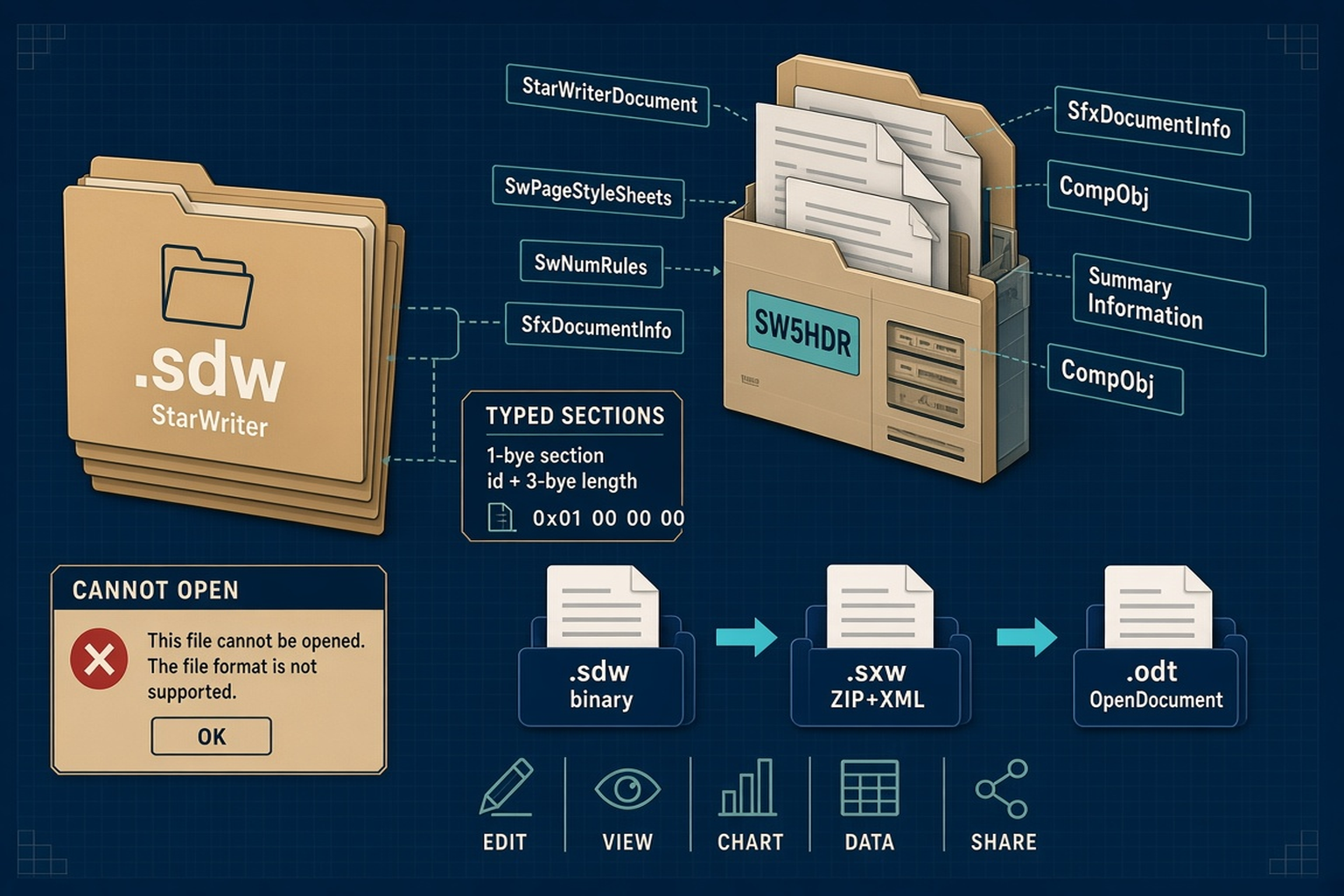
So the generation shift is: .sdw (binary StarWriter) → .sxw (OOo XML package) → .odt (OpenDocument). Same product family over time; three different on-disk packages. A text editor will not turn a .sdw into readable XML. Changing .sdw to .sxw or .odt in Explorer does not convert anything.
Microsoft Word has no built-in StarWriter .sdw importer for everyday users. Double-clicking a .sdw in 2026 fails as unsupported — not because the archive is corrupt. Community and tertiary guides note that LibreOffice Writer can still open many .sdw files via a legacy filter but cannot save back to .sdw. Reports also say Apache OpenOffice 4.0+ dropped binary StarOffice import — treat that as community/tertiary reporting, not a paraphrase of official release-note wording. LibreOffice is the practical FOSS reader today. Do not expect perfect fidelity for every 3.x dialect.
How the bytes work (OLE2 / SW5HDR / typed sections)
On disk, a .sdw is an OLE2 / Compound File — spell that out as Object Linking and Embedding version 2 compound file (structured storage). That is the same low-level container idea as classic Microsoft .doc, not a claim that the document is an ActiveX control. GNU libextractor’s StarWrite file-format notes document streams such as StarWriterDocument, SwPageStyleSheets, SwNumRules, SfxDocumentInfo, SummaryInformation, and \001CompObj.
The StarWriterDocument stream opens with a null-terminated version marker: SW3HDR, SW4HDR, or SW5HDR. After the header, the payload is organized as typed sections: a 1-byte section id plus a 3-byte little-endian length, which makes unknown sections skip-friendly. Content sections include SWG_CONTENTS (N), text nodes (T), and related typed blocks. The CompObj stream often carries human-readable format strings such as “StarWriter 3.0” / “4.0” / “5.0”, with internal version numbers 3450 / 3580 / 5050 in that documentation.
Binary package, not a rename of .odt
If Windows says the format is not supported, believe the container story: OLE2 streams and SW*HDR markers are not OpenDocument ZIP+XML. You need a real conversion step.
Sun, OpenOffice.org, and why these files still sit on disks
European, Linux, Solaris, and Windows StarOffice deployments in the late 1990s and early 2000s, free personal downloads after 1998, and corporate migrations that never finished all left folders labeled “StarOffice.” After Oracle discontinued commercial Oracle Open Office, there was no remaining Sun/Oracle vendor path to open old binary Writer files. The bytes remain.
A Word window that refuses .sdw is not proof the document is empty. A hex dump that starts like an OLE2 compound file is not proof you can paste the contents into a modern editor. These are legacy files from a product line that moved through binary StarWriter, OpenOffice.org XML, and OpenDocument — and then lost its commercial vendor.
Legacy File Converter lists StarOffice Writer / .sdw among supported documents on Supported File Types and converts .sdw locally on Windows to modern targets such as DOCX · PDF and related document outputs. Nothing is uploaded — see also Convert Legacy Files Without CloudConvert. For other word-processor History Lessons in the same series, see Lotus Word Pro (.lwp) and WordPerfect (.wpd).
Related reading
Ready to open your old files?
Start free, then unlock unlimited conversions with a one-time $79.95 Standard license. Download the Windows installer — full features for up to 10 files.
Free trial
Full app features · up to 10 files
Windows 10 or 11
Free trial — convert up to 10 files. Download the Windows installer and convert locally on your PC.
Direct Windows installer · offline MSI
Is this safe? — publisher, installer, and SmartScreen help
Requires Windows 10 or 11. No subscriptions.