
History Lesson: What Is a .lwp File? Word Will Not Open Lotus Word Pro
Lotus Word Pro / SmartSuite — not Ami Pro .sam, and not WordPerfect .wpd.
TL;DR
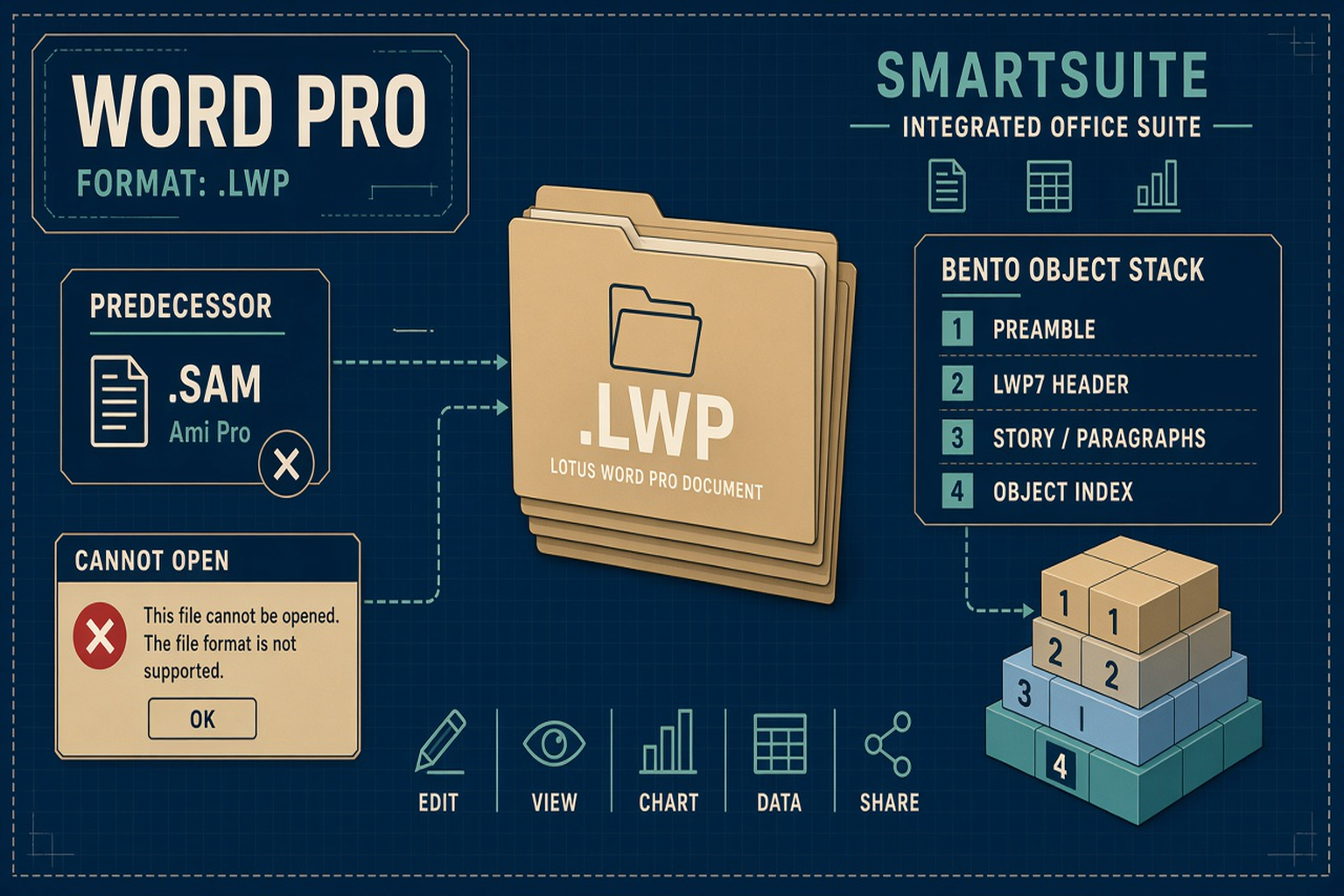
A .lwp is a Lotus Word Pro document from Lotus SmartSuite — a Bento-style binary package with MIME type application/vnd.lotus-wordpro. It is not Ami Pro .sam, not WordPerfect .wpd, and not LibreOffice’s native ODT. Modern Microsoft Word will not open it natively. Legacy File Converter converts .lwp locally to modern DOCX, PDF, and related document targets on this PC.
What is a .lwp file?
A .lwp file is a document from Lotus Word Pro, the word processor that shipped inside Lotus SmartSuite. The extension means Lotus Word Pro. The Internet media type is application/vnd.lotus-wordpro. The UK National Archives PRONOM registry lists the format as x-fmt/340 / fmt/340.
The line starts in Atlanta. Samna shipped Ami for Windows in 1988, then Ami Professional around 1989, with documents saved as .sam. Lotus’s tender for Samna was announced about 1 November 1990 (contemporary press reported the announced tender, not a later audited cash total). Ami Pro’s last major line stayed 16-bit; the Ami Pro 3.x era ended around Ami Pro 3.1.
Word Pro is the substantially rewritten 32-bit successor, with a new native .lwp format — not a simple rename of Ami Pro. WinWorld and Wikipedia note that Word Pro 96 was the first release to drop the Ami Pro name. Word Pro 96 Edition for Windows 3.1 shipped in August 1995 as part of SmartSuite 4.0 for Win 3.1 (OS2World wiki). SmartSuite 96 for Windows 95 was announced around September 1995 and due to ship in November 1995, with 32-bit Word Pro / Freelance / Approach (Tech Monitor / CBR, 29 September 1995).
.lwp ≠ .sam ≠ .wpd ≠ .odt
Ami Pro’s .sam is the predecessor (Word Pro can often still open .sam). WordPerfect’s .wpd is a different product. LibreOffice’s native text format is OpenDocument Text (.odt), not Lotus Word Pro.
Why won’t Word open a .lwp file?
Modern Microsoft Word has no reliable built-in Lotus Word Pro import for everyday users. Double-clicking a .lwp in 2026 typically fails — a generic “format is not supported” style refusal — not because the archive is corrupt, but because Word does not treat Lotus Word Pro as a native format. Older IBM marketing sometimes claimed Word compatibility; do not read that as proof that current Word opens .lwp cleanly.
LibreOffice Writer ships a Lotus Word Pro import filter, so some files open there. Community reports (for example libreoffice-users discussions around 2012) note imperfect results on complex tables, headers, and images — filters exist; fidelity varies. That is still not “Word opens it.”
How the bytes work (Bento, LWP7, object index)
Just Solve / Archiveteam describe .lwp as a binary that uses a Bento object container. LibreOffice’s lotuswordpro filter (see bento.hxx and the OpenStormBento namespace; Initial Developer IBM) documents the same idea. Spell out Bento here as Apple’s object-container technology used as a structured document package — not a claim that these files are the OpenDoc product.
Descriptions derived from that LibreOffice work put Word Pro 97 / 9-era files in a Bento-style layout: roughly a 16-byte preamble, an LWP7 file-header object, then typed objects that walk document → division → page layout → story → paragraphs, with a root-leaf object index. Prefer that Bento account over tertiary pages that claim an OLE2 D0 CF 11 E0 compound signature for .lwp.
Native .lwp replaced .sam
Word Pro could still open predecessor .sam files for compatibility. .lwp replaced .sam as the native save format — same product family, different on-disk package.
IBM, SmartSuite, and why these files still sit on disks
IBM acquired Lotus in June 1995. The prize was Notes; Word Pro rode along inside SmartSuite. Later suite milestones include SmartSuite 97, Millennium Edition (~1999), and Millennium 9.8 (~October 2002). Some Wikipedia users note Word Pro 9.8 Fixpack 6 around 2007 — treat late fixpack dates as secondary unless you have a primary IBM bulletin in hand.
IBM withdrew SmartSuite marketing in June 2013 (announced May 2013). All support ended 30 September 2014, with no replacement programs (Wikipedia SmartSuite; HotHardware coverage of the EOL in October 2014). After that date there was no remaining vendor reader from the company that once sold the suite.
The legacy files did not leave. Corporate Lotus SmartSuite archives, government and enterprise migrations, and personal backups still hold .lwp memos and reports long after SmartSuite’s end of life. Word will not open them. A text editor shows binary noise. Renaming .lwp to .doc or .odt does not convert the file.
For the Ami Pro predecessor story, see History Lesson: Ami Pro and the .sam File and the how-to Ami Pro (.sam) Documents. Legacy File Converter lists Lotus Word Pro / .lwp among supported documents and converts .lwp locally on Windows to modern targets such as DOCX · PDF · RTF · ODT · TXT · MD · HTML. Nothing is uploaded — see also Convert Legacy Files Without CloudConvert.
Related reading
Ready to open your old files?
Start free, then unlock unlimited conversions with a one-time $79.95 Standard license. Download the Windows installer — full features for up to 10 files.
Free trial
Full app features · up to 10 files
Windows 10 or 11
Free trial — convert up to 10 files. Download the Windows installer and convert locally on your PC.
Direct Windows installer · offline MSI
Is this safe? — publisher, installer, and SmartScreen help
Requires Windows 10 or 11. No subscriptions.