
History Lesson: What Is a .ppt File? Not the Same as .pptx
Binary PowerPoint presentation from the PowerPoint 97–2003 era — not Office Open XML .pptx; modern PowerPoint may File Block older ones.
TL;DR
A .ppt file is Microsoft PowerPoint’s older binary presentation — often an OLE / CFB compound file from the PowerPoint 97–2003 era — not a .pptx ZIP of XML, and not Apple Keynote .key. Modern PowerPoint may File Block older ones. For the practical how-to, see Old .ppt Files Blocked in Modern PowerPoint. Legacy File Converter converts .ppt to PPTX or PDF offline on this PC.
What is a .ppt file?
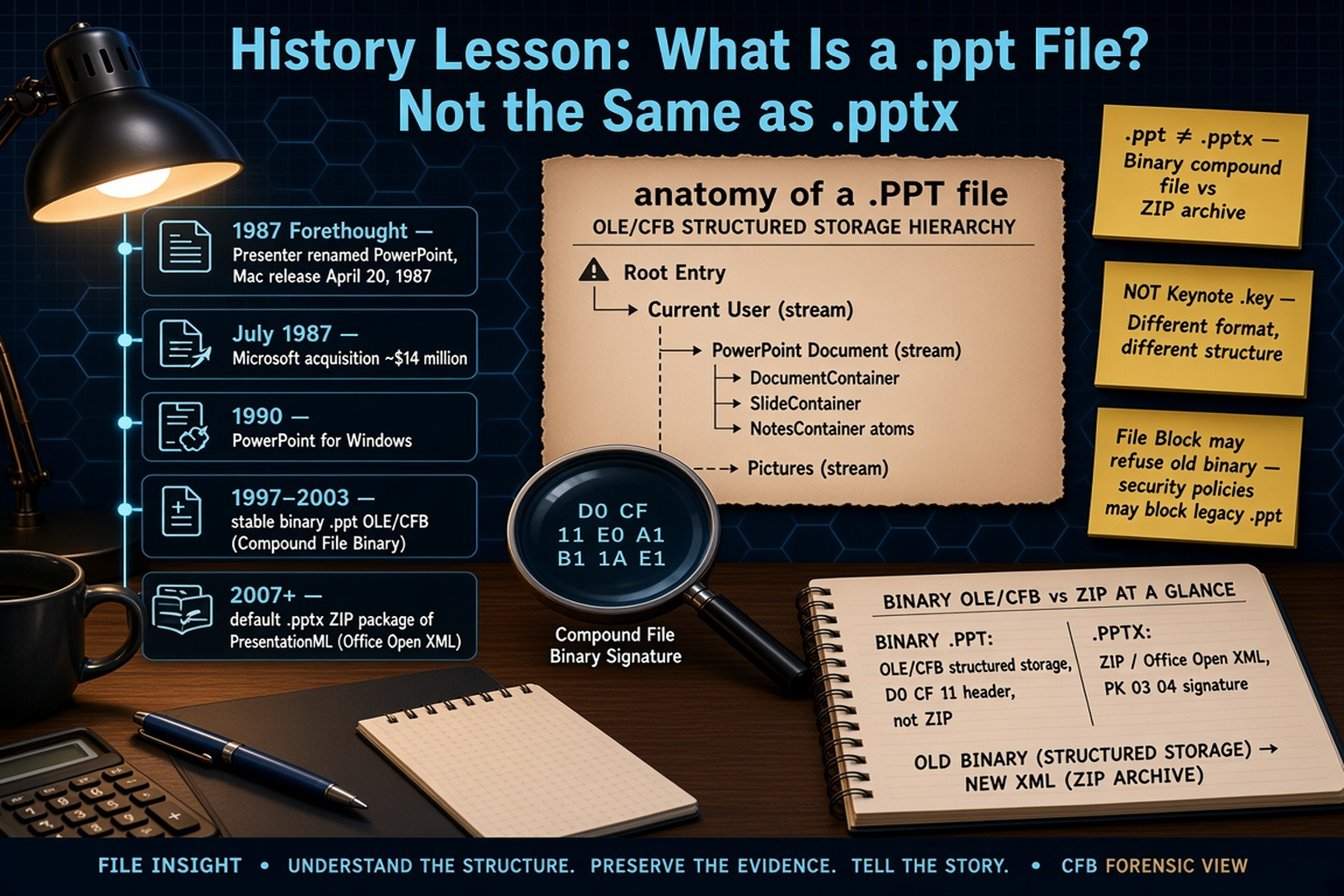
.ppt is Microsoft PowerPoint’s classic presentation extension. PowerPoint began at Forethought, Inc. in Sunnyvale — created by Robert Gaskins, Dennis Austin, Tom Rudkin, and their team, with working titles that included Diagram / Presenter before PowerPoint. The first release shipped for Macintosh only on April 20, 1987. Microsoft announced its acquisition of Forethought / PowerPoint on July 30, 1987 — Microsoft’s first significant software acquisition — and the PowerPoint unit stayed in Silicon Valley. PowerPoint for Windows arrived with version 2.0 in 1990 (Mac 2.0 had shipped earlier, in 1988).
Early versions (1987–1995, roughly 1.0–7.0) used a sequence of evolving binaries under .ppt; published specs for many pre-97 formats are largely unavailable. Library of Congress FDD000511 notes that starting with PowerPoint 4.0 (1994) the format was based on Compound File Binary; by 1997 a stable binary .ppt emerged. The classic default of the PowerPoint 97–2003 Windows / PowerPoint 98–2004 Mac era is documented as the Microsoft Office PowerPoint 97-2003 Binary File Format, [MS-PPT] (FDD000511), and has been covered by Microsoft’s Open Specification Promise since about 2007. From PowerPoint 2007, the default save became Office Open XML .pptx (PresentationML); binary .ppt remained as a compatibility path, not the default.
Same family, related extensions
In the same binary era you will also see .pps (slideshow) and .pot (template). Those share the PowerPoint family story; this article focuses on .ppt — the ordinary editable presentation file.
Is a .ppt the same as a .pptx?
No. Classic PowerPoint 97–2003 .ppt is a binary OLE (Object Linking and Embedding) / CFB (Compound File Binary) structured-storage file: a miniature file system of storages and streams holding typed PowerPoint records. .pptx is Office Open XML / PresentationML: a ZIP / OPC (Open Packaging Conventions) package of XML parts — not the same bytes as .ppt. Peeking at a real .pptx often shows ZIP magic `PK 03 04`. Renaming .ppt to .pptx does not convert it.
.ppt ≠ .pptx (and not Keynote .key)
Different structure. Different world. A CFB binary presentation and an Office Open XML ZIP are not interchangeable by renaming the extension. Apple Keynote .key is another format entirely — different product, different package.
How the binary format is put together (CFB / OLE + records)
A CFB file commonly begins with an eight-byte header signature: `D0 CF 11 E0 A1 B1 1A E1` (Microsoft [MS-CFB] / Library of Congress). That signature identifies Compound File Binary structured storage — a “file system within a file,” not a ZIP archive and not readable as plain text.
Mandatory streams include Current User and PowerPoint Document; optional streams include Pictures and Summary Information. The PowerPoint Document stream holds typed records: atom records and container records (for example DocumentContainer, SlideContainer, and NotesContainer). This is not Excel’s BIFF (Binary Interchange File Format) — do not call PowerPoint “BIFF.” Excel and PowerPoint both rode the same OLE / CFB container idea in that era; the record languages inside are different.
Why does modern PowerPoint block some old .ppt files?
Modern PowerPoint Trust Center File Block can refuse or restrict older binary types. Settings can block PowerPoint 97–2003 presentations, shows, templates and add-in files, and separately “Legacy converters” for pre-97 formats. Users can review Open checks under File → Options → Trust Center → File Block Settings. Group Policy / security baselines may force broader blocks than the defaults.
A blocked .ppt is often intact and untrusted by policy — not proof the deck is empty or damaged. Keep security settings intact and convert when you need a trusted modern copy. For the practical path, see Old .ppt Files Blocked in Modern PowerPoint.
File Block ≠ corrupt file
A blocked PowerPoint 97–2003-era .ppt is often intact and untrusted by policy — not proof the presentation is empty or damaged. Do not treat weakening File Block as the solution; convert to a trusted modern format instead.
Why .ppt legacy files still show up in 2026
Decades of archives still hold .ppt. “Save as PowerPoint 97–2003 Presentation,” email attachments, mixed offices, and training decks keep copies moving. Related .pps slideshows from the same era travel the same routes.
These legacy files are not automatically broken. They are older PowerPoint binaries waiting for a format that current PowerPoint trusts. For the practical how-to, see Old .ppt Files Blocked in Modern PowerPoint. Legacy File Converter converts .ppt to PPTX or PDF offline on this PC.
Related reading
Ready to open your old files?
Start free, then unlock unlimited conversions with a one-time $79.95 Standard license. Download the Windows installer — full features for up to 10 files.
Free trial
Full app features · up to 10 files
Windows 10 or 11
Free trial — convert up to 10 files. Download the Windows installer and convert locally on your PC.
Direct Windows installer · offline MSI
Is this safe? — publisher, installer, and SmartScreen help
Requires Windows 10 or 11. No subscriptions.