
History Lesson: What Is a .key File? Not a License Key
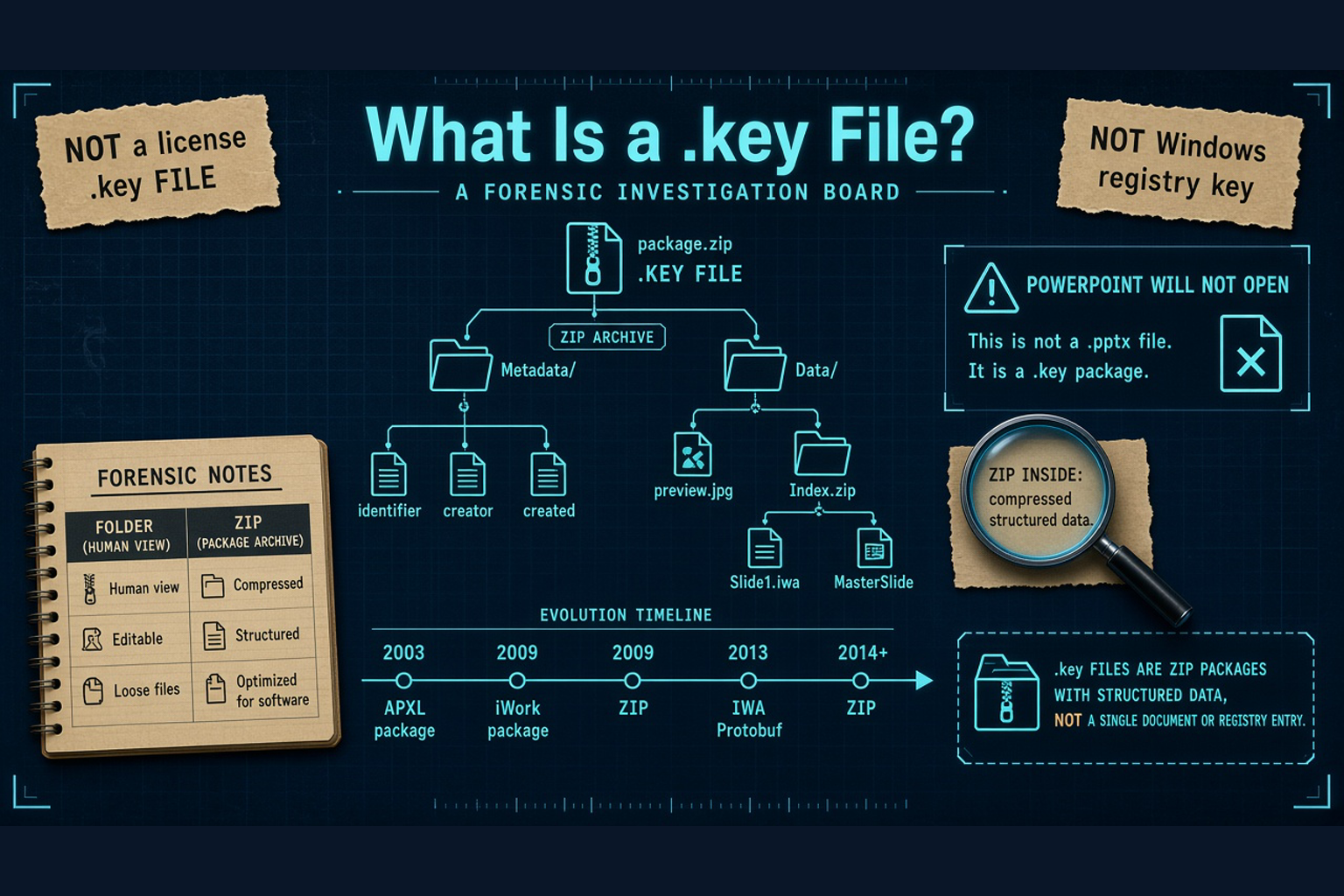
Apple Keynote presentation from iWork — PowerPoint will not open it; on Windows it may look like a folder or a ZIP. Not a software license file.
TL;DR
A .key file is often an Apple Keynote presentation from the iWork suite. PowerPoint will not open it. On Windows it may look like a folder or a ZIP. It is not automatically a software license file or a Windows registry key. For the practical how-to, see Opening Apple Keynote Files on Windows. Legacy File Converter converts .key to PPTX or PDF offline on this PC.
What is a .key file?
A .key file is often a presentation from Keynote, Apple’s slide app in the iWork family. Apple unveiled Keynote publicly on January 7, 2003 at Macworld Expo San Francisco. Apple’s Newsroom press release announced it as a paid standalone app and required Mac OS X 10.2 Jaguar-era hardware. The same release framed Keynote as professional-quality presentations with import and export for PowerPoint, QuickTime, and PDF.
Reporting and Wikipedia summarize that Keynote began as software Steve Jobs used for Apple’s own keynote events; before that he used Concurrence from Lighthouse Design on NeXTSTEP / OPENSTEP. In 2005, Keynote 2 shipped with Pages in iWork '05. Keynote later became free on the Mac App Store and also ran on iOS / iPadOS and iCloud.com. There is no native Windows Keynote app. Themes use the related .kth extension.
Not a license key (and not a registry key)
FileInfo and similar pages often lead with a license-key meaning for .key. Same extension, different worlds. A PEM-style crypto key may start with `-----BEGIN … KEY-----`. A Keynote deck is a package or ZIP of slides — not a Windows registry key and not automatically a software license file.
Why won't PowerPoint open a .key file?
PowerPoint does not natively import Keynote. There is no built-in PowerPoint filter for the Apple Keynote format, and there is no native Windows Keynote app to fall back on. Double-clicking a Mac-sent deck on a PC that only has PowerPoint usually fails — not because the file is corrupt, but because PowerPoint never treated Keynote as a native format.
iCloud.com Keynote can re-export a deck, but that is a cloud path. This article’s conversion path is local: keep the work on this PC without uploading the slides.
Package or ZIP — why Windows sees a folder
Keynote shares the same iWork packaging story as Pages and Numbers — several container eras, not one frozen layout. Early Keynote 1.x used a macOS bundle / package with presentation.apxl. APXL means Apple Presentation XML; Apple published a schema-era note as TN2067. Keynote 2.x / iWork packaging notes rename that file to index.apxl (or compressed XML inside the package).
iWork '09 often stored Keynote as a single-file ZIP. iWork 2013 returned to a package shape with a nested Index.zip and .iwa files. IWA means iWork Archive: Protobuf / Protocol Buffers streams with custom Snappy-style compression (Snappy is Google’s fast compression family; iWork uses a custom variant inside IWA). iWork 2014 and later commonly use a single-file ZIP again with IWA content. Keynote’s Index often has per-slide SlideN.iwa files plus **MasterSlide-*.iwa**.
Renaming to .zip ≠ conversion
Copying a .key and renaming the copy to .zip sometimes reveals preview images or nested archives. Useful for a quick peek — not a full conversion of the editable deck. Keep the original .key.
How the on-disk format evolved
Own the timeline without inventing extra years: 2003 APXL package era with Keynote 1.x; Keynote 2 / iWork package with index.apxl; 2009 often a single-file ZIP; 2013 package again with nested Index.zip and IWA Protobuf streams; 2014+ commonly a single-file ZIP with IWA content. That is why two “.key” files from different years can look different in Explorer even when both are real Keynote decks.
Inside you may still find metadata, preview assets such as preview.jpg, and nested archives with per-slide .iwa files. The interoperability point for Windows users is simpler: folder vs ZIP appearance does not give PowerPoint a native .key importer.
Why .key legacy files still show up in 2026
Macs, iPads, and iCloud.com still produce Keynote decks. Attachments move to mixed offices. Old project folders keep .key beside PowerPoint files. On a Windows PC they look foreign — folder, ZIP, or unknown — and PowerPoint refuses them. These legacy files are intact Keynote presentations waiting for a real conversion path, not broken PowerPoint files.
You do not need a Mac just to present or edit the slides again. For the practical how-to, see Opening Apple Keynote Files on Windows. Legacy File Converter converts .key to PPTX or PDF offline on this PC.
Related reading
Ready to open your old files?
Start free, then unlock unlimited conversions with a one-time $79.95 Standard license. Download the Windows installer — full features for up to 10 files.
Free trial
Full app features · up to 10 files
Windows 10 or 11
Same free trial as always — download the Windows installer and convert locally on your PC.
Direct Windows installer · offline MSI
Is this safe? — publisher, installer, and SmartScreen help
Requires Windows 10 or 11. No subscriptions. 100% Windows Native.