
History Lesson: What Is a .psd File? Photos Will Not Open Photoshop Layers
Adobe’s layered Photoshop Document — not a flat JPG. Windows Photos often will not open it.
TL;DR
A .psd is Adobe’s Photoshop Document — a layered design project, not a flat JPG. The file always starts with ASCII 8BPS. Windows Photos and most viewers often will not open it. PSB is the large-document cousin (version 2). Legacy File Converter converts .psd to JPG, PNG, or PDF offline on this PC.
What is a .psd file?
Thomas Knoll, then a Ph.D. student at the University of Michigan, began a display program called Display on a Macintosh Plus around 1987. His brother John Knoll at Industrial Light & Magic pushed it toward a full image editor. The product was renamed ImagePro, then Photoshop. Before Adobe, a short-term Barneyscan XP distribution (~200 copies) shipped with a slide scanner.
Adobe licensed distribution in September 1988. Photoshop 1.0 shipped February 19, 1990 for Macintosh — contemporary reporting often cites a list price around $895. The first Windows release was Photoshop 2.5 in November 1992 (port by Seetharaman Narayanan / S. Narayanan). Adobe purchased rights from the Knolls on March 31, 1995 for $34.5 million (SEC 10-K / Wikipedia).
Layers arrived in Photoshop 3.0 (September 1994 on Mac; Windows later that November). That feature is what made .psd a true project file — editable stacks of pixels, text, masks, and adjustments — instead of a single flat picture. The extension means Photoshop Document. The MIME type is image/vnd.adobe.photoshop. The Library of Congress documents the format as partially documented proprietary (fdd000523); PRONOM lists x-fmt/92 for PSD and fmt/996 for PSB; RFS lists PSD / PSB as acceptable for still images.
PSD ≠ flat photo
A .psd is a design document with editable layers. A JPG or PNG is a flattened delivery image. Opening without Photoshop usually means flatten-to-JPG/PNG/PDF — not full layer editing.
Why won’t Windows Photos open my .psd?
Windows Photos, File Explorer, and most everyday viewers are built for simple bitmaps. A .psd stores layers, masks, color modes, and related project data. Double-click often yields a generic icon or “format is not supported” — not a camera roll photo.
Photoshop can store a flattened composite (the Maximize Compatibility option) so other apps can show a preview. Without a usable composite, many viewers fail entirely. Explorer preview needs a dedicated handler for formats like .psd — see The Image Formats Windows Explorer Won’t Preview — But We Will.
How the bytes work (8BPS, layers, composite)
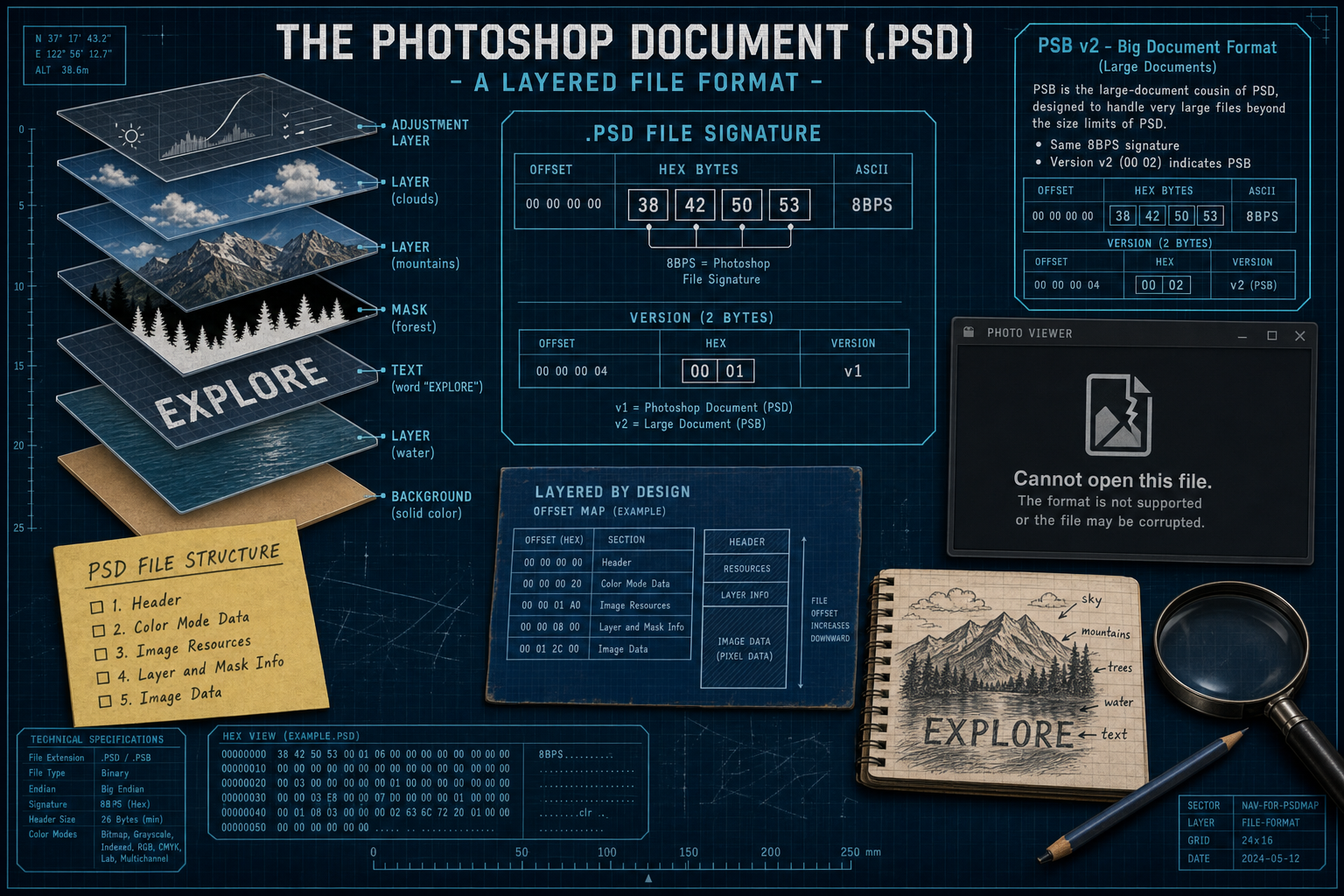
Every PSD / PSB file begins with the ASCII signature 8BPS (hex 38 42 50 53) — “8 bits Per Sample,” Adobe’s joke name for the format. The two-byte version field is 1 (00 01) for classic PSD and 2 (00 02) for PSB. The File Header is a fixed 26 bytes.
Adobe’s File Formats Specification (and the Library of Congress) describe five major sections in order: File Header, Color Mode Data, Image Resources, Layer and Mask Information, and Image Data. Color modes in the header include Bitmap, Grayscale, Indexed, RGB, CMYK, Multichannel, Duotone, and Lab. Layers and masks live in the Layer and Mask Information section; converting to JPG or PNG flattens them into one picture.
Composite vs layers
The optional composite flattened image helps other apps preview the file. Editable layers stay in Layer and Mask Information. Flattening for JPG/PNG/PDF is intentional — you get a usable picture, not a re-editable Photoshop project.
PSD vs PSB — and why these files still sit on disks
PSD maxes out around 30,000 pixels per side and about 2 GB. PSB — Large Document Format, nicknamed “Photoshop Big” — is the same family at version 2, with limits up to about 300,000 pixels per side. Same 8BPS signature; different version byte. Own the confusion: PSD ≠ flat photo, and PSD ≠ PSB.
In 2026 these files still sit in archives, designer handoffs, agency backups, and Creative Cloud-era project folders — decades of layered work that outlasted the machine that made them. They are legacy files in the sense that everyday Windows tools will not treat them like a JPG from your camera.
You do not need Photoshop just to see what is inside. For the practical how-to, see View and Convert Photoshop (.psd) Files Without Photoshop. Legacy File Converter converts .psd to JPG, PNG, or PDF offline on this PC.
Convert your files
Related reading
Ready to open your old files?
Start free, then unlock unlimited conversions with a one-time $79.95 Standard license. Download the Windows installer — full features for up to 10 files.
Free trial
Full app features · up to 10 files
Windows 10 or 11
Same free trial as always — download the Windows installer and convert locally on your PC.
Direct Windows installer · offline MSI
Is this safe? — publisher, installer, and SmartScreen help
Requires Windows 10 or 11. No subscriptions. 100% Windows Native.