
History Lesson: What Is a Multipage .tif File? Photos Shows Only Page One
Aldus’s tagged scan format can chain many pages in one file — Baseline readers may only show the first.
TL;DR
A multipage .tif / .tiff is one TIFF file with several linked Image File Directories (IFDs) — pages chained by NextIFD. Windows Photos often shows only the first page; that is a reader limit, not a truncated scan. Scanners, fax archives, and digitization workflows still produce these legacy files. Legacy File Converter converts .tif / .tiff to PDF (page order kept) or JPG / PNG offline on this PC.
What is a multipage .tif file?
TIFF is commonly expanded as Tag Image File Format or Tagged Image File Format. The 1992 TIFF 6.0 title page does not spell out the abbreviation (the Library of Congress notes this). A multipage TIFF is not a broken single photo — it is one file that holds several pages (subfiles) linked in a chain.
The format was created by Stephen Carlsen (also credited as Steve Carlsen, Principal Engineer) at Aldus Corporation for desktop publishing and scanner interchange — so Aldus would not need a separate filter for every scanner model. The first published specification arrived in autumn 1986 after two major earlier drafts and was retrospectively labeled Revision 3.0 (the TIFF 6.0 preface). Some histories also list an initial release date of 12 September 1986; treat that as the same early-publication window.
Revision 4.0 followed in April 1987; Revision 5.0 in October 1988 (palette color and LZW — Lempel–Ziv–Welch — compression). TIFF 6.0 Final is dated June 3, 1992 (Aldus). After the Aldus–Adobe merger on September 1, 1994, Adobe held the copyright; Adobe still owns the TIFF 6.0 specification.
Multipage ≠ truncated
If Photos shows one letter and the file size looks huge, the other pages are usually still in the file as later IFDs — not cropped off the scan.
Why does Windows Photos show only the first page?
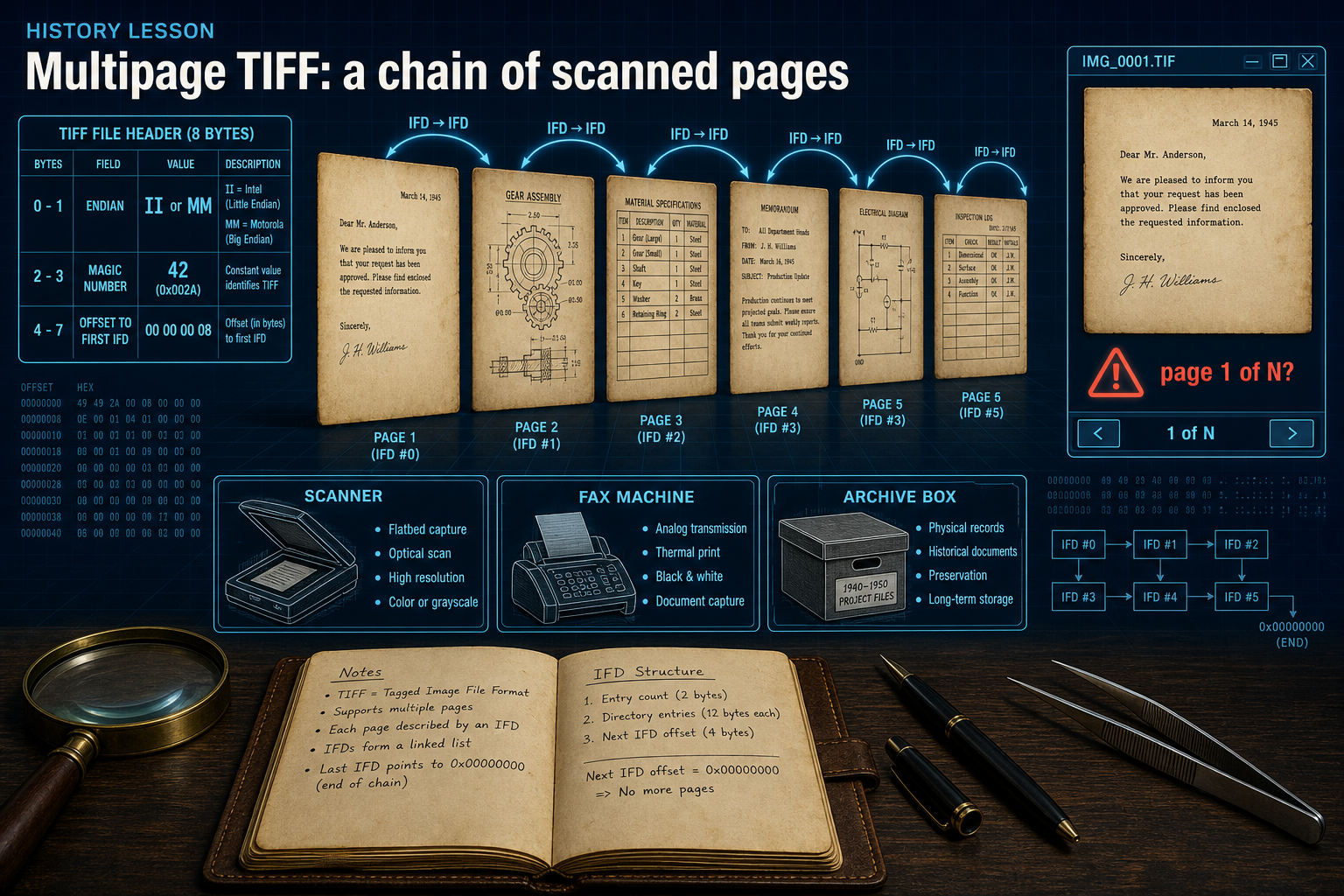
Every TIFF starts with an 8-byte Image File Header. Bytes 0–1 are the endian (byte-order) mark: II for little-endian / Intel, or MM for big-endian / Motorola. The next 16-bit word is always 42 (0x002A) — the TIFF docs famously give that constant “deep philosophical significance.” Magic bytes are therefore 49 49 2A 00 or 4D 4D 00 2A. Bytes 4–7 point to the first IFD.
Each IFD plus its bitmap is a subfile. Multiple pages are linked by the NextIFD offset on the main-IFD chain — the classic multipage fax and scan layout. NewSubfileType bit 1 marks a page of a multi-page image; the PageNumber tag indexes pages. Baseline TIFF (the mandatory common subset defined in TIFF 6.0) readers must be prepared for multiple subfiles, but they are not required to render anything after the first IFD. That spec rule is the technical root of “only page one” viewers.
Windows Photos commonly shows only the first page of a multipage TIFF (widely reported on Microsoft Q&A). Older Windows Photo Viewer / Picture and Fax Viewer historically supported multipage TIFF navigation. Own the naming: Photos ≈ first page; Photo Viewer often can page through — they are different apps.
SubIFD ≠ multipage chain
SubIFD (tag 330) is for child trees — thumbnails, masks, and related PageMaker / TIFF Trees structures. That is not the same as the main NextIFD page chain used for multipage scans.
How the bytes work — and why “Thousands of Incompatible File Formats”
Compression examples in the wild include none, PackBits, CCITT Group 3 / 4 (bitonal fax — Consultative Committee for International Telegraphy and Telephony, the historical name behind those fax encodings), LZW (from Revision 5 onward; patents expired around 2003–2004 per Library of Congress notes), and JPEG as an extension. TIFF 6.0 separates Baseline TIFF from Extensions — the industry joke “Thousands of Incompatible File Formats” is really about optional features piling up beyond what every reader implements.
Classic TIFF uses 32-bit offsets, so files top out near about 4 GB. BigTIFF (later, with 64-bit offsets) exists for huge scientific and archival images — useful to know, but not the everyday multipage-scan story.
Own the remaining confusion: .tif ≈ .tiff (same format family; the shorter extension was common where names were limited to three characters). Multipage main-IFD chain ≠ SubIFD thumbnails. And a multipage TIFF is not a truncated single image.
Why multipage TIFF legacy files still sit on disks
Scanners, fax servers, medical and legal document imaging, and cultural-heritage digitization still emit multipage TIFF. The Library of Congress holds large TIFF collections and lists TIFF among preferred formats for many still-image digitization workflows (including FADGI — Federal Agencies Digital Guidelines Initiative — guidance). In 2026 these legacy files keep showing up in archive boxes, scan folders, and handoffs where capture quality mattered more than consumer photo apps.
You do not need a specialty viewer just to read every page. For the practical how-to, see Turn Multi-Page TIFF Scans Into a Single PDF. Legacy File Converter converts .tif / .tiff to PDF (keeps page order) or JPG / PNG offline on this PC.
Convert your files
Related reading
Ready to open your old files?
Start free, then unlock unlimited conversions with a one-time $79.95 Standard license. Download the Windows installer — full features for up to 10 files.
Free trial
Full app features · up to 10 files
Windows 10 or 11
Same free trial as always — download the Windows installer and convert locally on your PC.
Direct Windows installer · offline MSI
Is this safe? — publisher, installer, and SmartScreen help
Requires Windows 10 or 11. No subscriptions. 100% Windows Native.