
History Lesson: What Is a .dif File? Data Interchange Format Spreadsheet
Software Arts’ ASCII spreadsheet interchange from the VisiCalc era — not CSV, not SYLK, not a “difference” file.
TL;DR
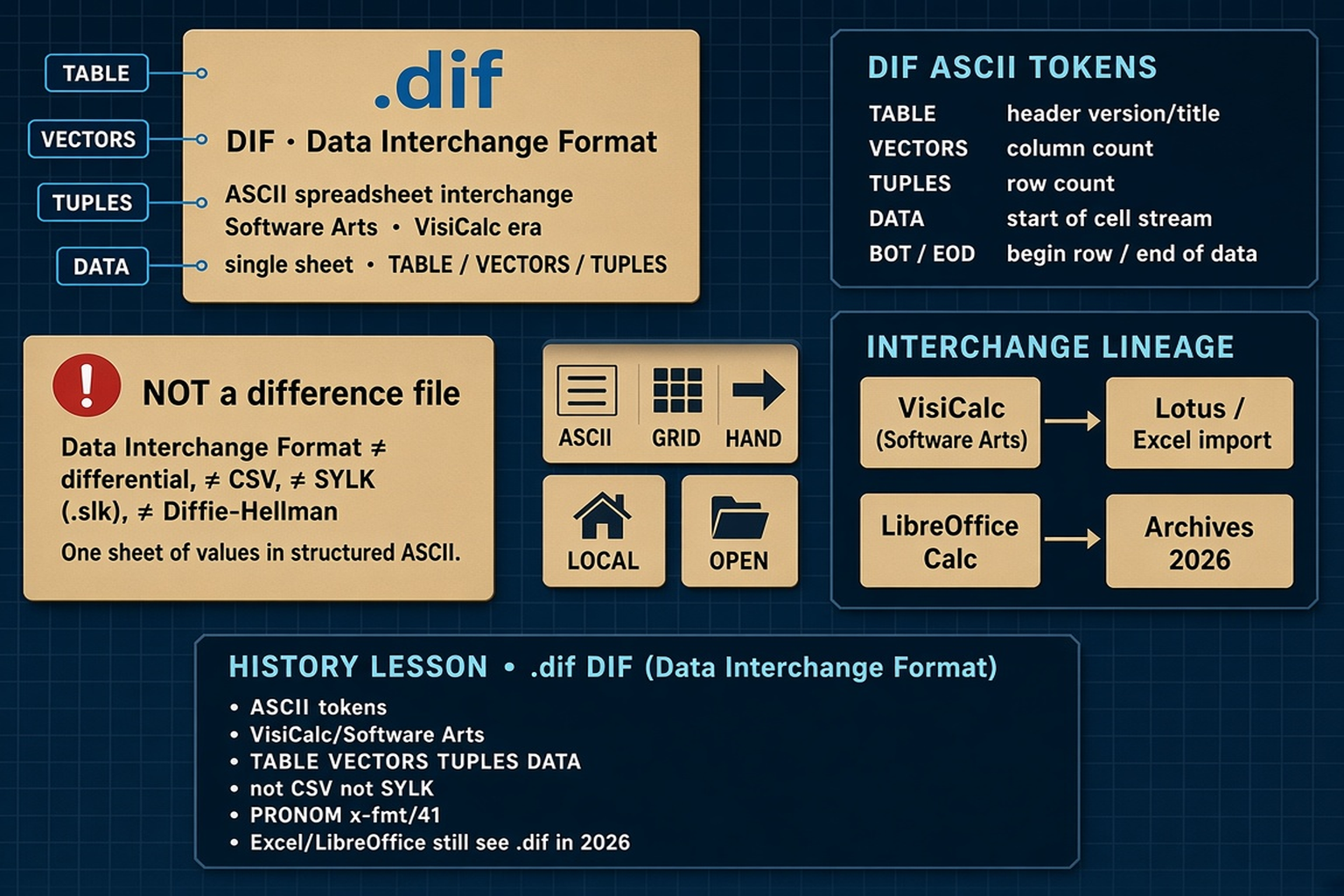
A .dif file is Data Interchange Format — an ASCII spreadsheet interchange format from Software Arts (the creators of VisiCalc) in the early 1980s. It moves one sheet of rows and columns between programs using tokens such as TABLE, VECTORS, TUPLES, and DATA. It is not CSV, not SYLK (.slk), and not a generic “difference” or differential file. Legacy File Converter converts .dif offline on this PC — nothing is uploaded.
What is a .dif file?
DIF stands for Data Interchange Format. The extension people still find on disks is .dif. Software Arts, Inc. — the company behind VisiCalc, the early personal-computer spreadsheet — published the format so different programs could exchange a single spreadsheet without retyping numbers. A COMPUTE! magazine new-products note in June 1982 described Software Arts establishing DIF and a DIF Clearinghouse for technical specs; the clearinghouse offered the specification to developers. Contemporary write-ups and the later Encyclopedia of Graphics File Formats summary credit Software Arts as originator and note the format’s 7-bit ASCII layout (hardware endianness is a non-issue because the file is text).
Wikipedia’s overview (useful as a starting point, not the last word) attributes the design primarily to Bob Frankston, with input from others including Mitch Kapor so DIF could work with VisiPlot — Kapor later founded Lotus. The technical specification carried a 1981 copyright. A widely cited early public article is Candace E. Kalish and Malinda F. Mayer, “DIF: A Format for Data Exchange between Applications Programs,” in BYTE magazine, November 1981. Bitsavers and other archives still hold DIF Clearinghouse / VisiCorp-era PDF copies of the technical specification.
Why it spread: every popular spreadsheet kept its own native save format. An agreed ASCII interchange meant VisiCalc, charting tools, database managers, and later Lotus 1-2-3, Multiplan, Quattro Pro, Excel, and open-source calcs could import or export the same table. PRONOM (The National Archives’ format registry) lists Data Interchange Format as x-fmt/41. Microsoft still documents DIF among Excel’s supported types; LibreOffice Calc ships a DIF filter. Raymond Chen’s *Old New Thing* note on clipboard formats CF_DIF and CF_SYLK ties DIF to the VisiCalc world the same way SYLK ties to Multiplan — interchange labels that outlived the apps that popularized them.
Open it in Notepad
A typical .dif is readable text: TABLE / VECTORS / TUPLES / DATA headers, then BOT rows and an EOD marker. That ASCII layout is why DIF worked as a cross-program handoff when binary sheet formats did not travel well.
How DIF differs from CSV and SYLK
A DIF file has a header section and a data section. Required header topics include TABLE (title / version-style metadata), VECTORS (column count), TUPLES (row count), and DATA (marks the start of the cell stream). In the data section, special markers such as BOT (beginning of a tuple / row) and EOD (end of data) frame numeric and string cells. Chunks are short multi-line records — headers typically three lines, data values typically two — rather than one comma-separated line per row.
That structure is the point of contrast with everyday CSV (comma-separated values): CSV is a flat delimiter dump with no VECTORS/TUPLES contract. SYLK (.slk, Symbolic Link) is a different ASCII lineage from Microsoft Multiplan / Excel, built from semicolon-delimited records that start with ID and end with E. Microsoft’s own Excel documentation lists DIF and SYLK as separate save formats; both usually cover only the active sheet. DIF also cannot represent a multi-sheet workbook in one file — a limitation called out in format summaries and PRONOM’s description.
Name collisions
“DIF” is not a filesystem differential, not Diffie–Hellman crypto, and not Navy DIF (an unrelated 1980s document-interchange name). Spreadsheet .dif means Data Interchange Format. Renaming .dif to .csv does not convert it.
Why Excel may still open a .dif — and why .dif files remain in 2026
Microsoft still lists **DIF (*.dif) among Excel file formats and notes that saving as DIF keeps the active sheet only. Support documentation for features lost when saving to other formats explains that DIF preserves text, values, and formulas on that sheet under specific display rules, while charts, comments, VBA, and most formatting do not survive. LibreOffice documents a Calc DIF import/export filter (character-set options included). Some historical apps that once advertised DIF support are end-of-life; modern defaults favor XLSX, ODS, or CSV**. So a double-click may still succeed in Excel or Calc — or a workflow may have dropped DIF from the Save As list even though old exports remain on disk.
In 2026 these legacy files still appear in email attachments, lab and instrument exports, finance share folders, and archives next to .xls, .dbf, Lotus, and Quattro sheets. They are not broken CSVs — they are an older structured ASCII handoff. You do not need VisiCalc to read what is inside. Legacy File Converter lists Data Interchange Format / .dif among supported spreadsheets on Supported File Types and converts .dif locally on Windows to modern targets such as XLSX or CSV. Nothing is uploaded — see also Convert Legacy Files Without CloudConvert.
Related reading
Ready to open your old files?
Start free, then unlock unlimited conversions with a one-time $79.95 Standard license. Download the Windows installer — full features for up to 10 files.
Free trial
Full app features · up to 10 files
Windows 10 or 11
Free trial — convert up to 10 files. Download the Windows installer and convert locally on your PC.
Direct Windows installer · offline MSI
Is this safe? — publisher, installer, and SmartScreen help
Requires Windows 10 or 11. No subscriptions.