
History Lesson: What Is a .wmf File? Why Clip Art Shows a Blank Box
Microsoft’s GDI draw-command clip-art format — modern viewers often show an empty box.
TL;DR
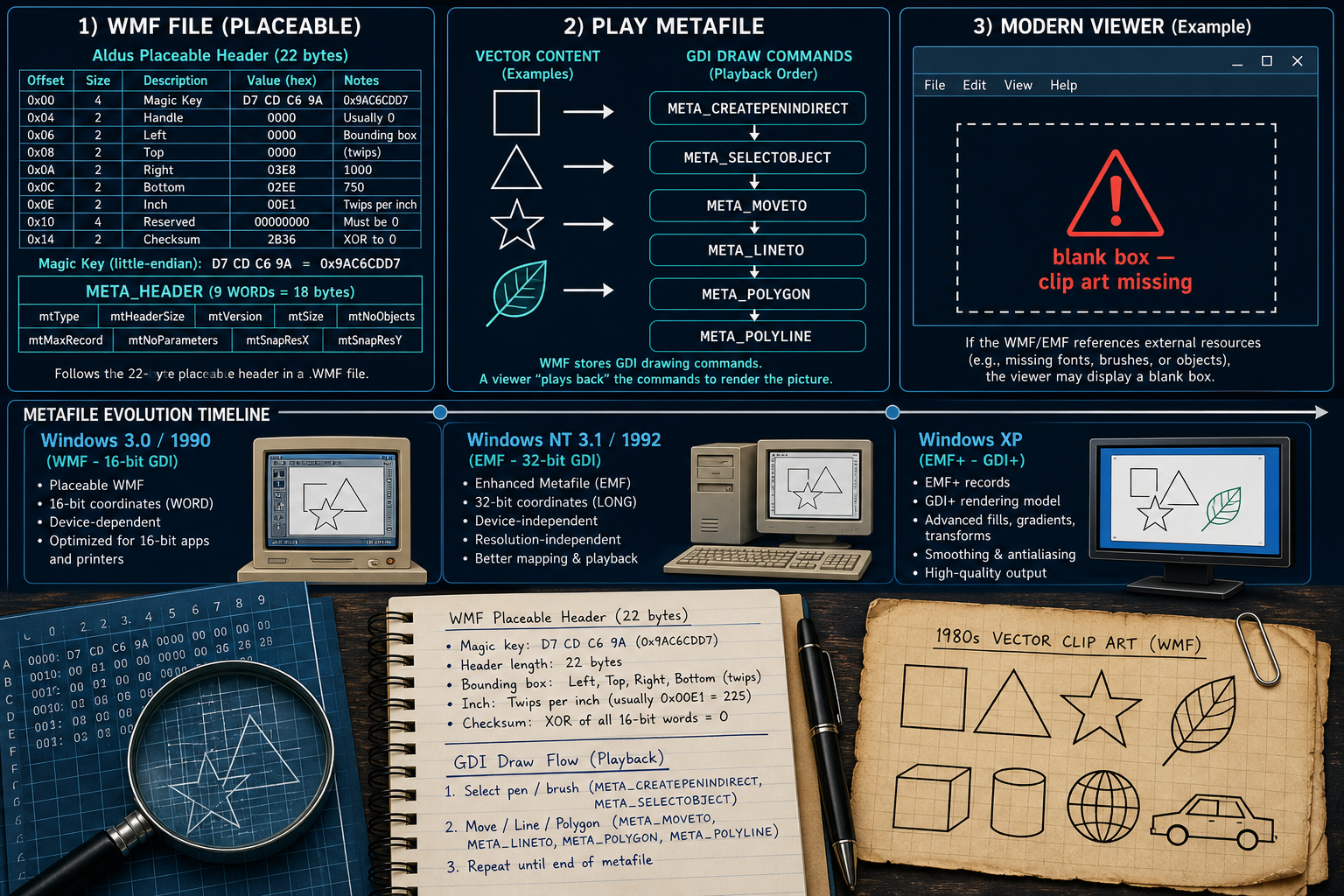
A .wmf is a Windows Metafile (WMF) — a sequence of Windows Graphics Device Interface (GDI) draw-command records that a viewer plays to redraw vector clip art. Many modern apps show a blank box instead. That usually means the viewer will not play the metafile, not that the file is empty. .emf (Enhanced Metafile) and EMF+ (Enhanced Metafile Format Plus Extensions) are later cousins. These legacy files still sit in old Office and Publisher libraries. For practical conversion steps, see When Old WMF / EMF Clip Art Won't Display. Legacy File Converter converts .wmf / .emf to PNG, JPG, or PDF offline on this PC.
What is a .wmf file?
A .wmf file is a Windows Metafile: a 16-bit format that stores a sequence of records of Windows GDI drawing commands. A viewer does not “decode a photo” the way it does a JPG — it plays those commands into a device context, much as RFC 7903 compares metafile playback to how PostScript is executed to produce output. WMF can hold vector and raster graphics together.
Microsoft released WMF with Windows 3.0; RFC 7903 frames the format as released in 1990. Early public documentation appears in the Windows 3.1 SDK (1992), again per that RFC. For a generation of Office and Windows clip art, logos, and diagrams — plus clipboard, print, and document embedding — WMF was the native vector vehicle. RFC 7903 also notes that WMF is referenced non-normatively in OOXML, which is one reason interoperability still matters.
.wmf ≠ SVG — and not “Windows Media”
A .wmf here is Windows Metafile (GDI draw records), not SVG and not a Windows Media audio/video container. Same three letters, different universe.
WMF vs EMF (and EMF+)
EMF (Enhanced Metafile) arrived with Windows NT 3.1 in 1992. It is 32-bit and Win32-based, designed for device independence as the successor to the more device-dependent WMF. Coordinates and record layout grow up with Win32; the playback model is still “replay GDI,” but with a cleaner, resolution-friendlier container.
EMF+ came with Windows XP / GDI+: GDI+ records embedded inside EMF comment records. Microsoft’s GDI+ docs describe EMF+ Only and EMF+ Dual variants. Important recording rule: GDI+ can display WMF, EMF, and EMF+, but it can record only EMF / EMF+ — not WMF. Own the naming stack: WMF (16-bit classic) → EMF (32-bit enhanced) → EMF+ (GDI+ extensions).
Three cousins, one blank-box complaint
People say “WMF” for any old Office metafile. Check the bytes: placeable WMF, plain WMF, EMF, and EMF+ Dual are related — and modern viewers treat them unevenly.
Why does old clip art show a blank box?
A blank box in a modern app is usually failed or refused playback, not an empty file. Late December 2005, CVE-2005-4560 described crafted WMF files that used SETABORTPROC via META_ESCAPE / the GDI Escape path to run code — the Metafile Image Code Execution (MICE) issue. Microsoft shipped MS06-001 on January 5, 2006. An MSRC blog explained the SetAbortProc print-abort callback heritage; Internet Explorer skipped META_ESCAPE, but an IFRAME → shell → Windows Picture and Fax Viewer path was a known vector. RFC 7903 notes that MICE won 2007 Pwnie awards for “Mass 0wnage” and “Breaking the Internet.”
RFC 7903 also states that EMF was not afflicted by that specific MICE flaw. Still, after 2005–2006, many products hardened, sandboxed, or simply dropped GDI metafile pipelines. In 2026, a blank box often means security policy plus missing playback — not “the clip art vanished.”
How the bytes work (placeable WMF and EMF headers)
Many .wmf files start with an optional Aldus Placeable Metafile header: 22 bytes before the standard META_HEADER. The key must be 0x9AC6CDD7 — little-endian bytes D7 CD C6 9A. The placeable header also carries a bounding box, an inch field (units per inch), and a checksum. Classic Windows PlayMetaFile does not accept the placeable header; strip the first 22 bytes, then play the remaining WMF. Placeable and non-placeable .wmf are both legitimate variants — own that confusion when a hex dump “doesn’t match the SDK sample.”
For EMF, RFC 7903 describes the opening EMR_HEADER: Type is the little-endian DWORD 0x00000001, and Size should be at least 88. After the header come enhanced metafile records that a Win32 playback path interprets. Specs matter for interoperability: Microsoft published [MS-WMF], [MS-EMF], and [MS-EMF+] under the Open Specification Promise (RFC 7903: since 2007). Media types image/wmf and image/emf are registered in RFC 7903 (September 2016).
Blank viewer ≠ missing artwork
If the file has real size and a recognizable WMF/EMF header, the vectors are usually still inside. The modern viewer is declining to play them.
Why .wmf and .emf legacy files still sit on disks in 2026
Old Office and Publisher clip-art libraries, logos, and diagrams still use these formats. Files get extracted from or sit beside legacy documents — binders, branding kits, and project folders from the metafile era. The large body of clip art already shipped is why WMF / EMF keep showing up even when everyday apps blank them out.
You do not need a specialty forensics toolkit just to see the artwork again. For the practical how-to, see When Old WMF / EMF Clip Art Won't Display. Legacy File Converter converts .wmf / .emf to PNG, JPG, or PDF offline on this PC.
Related reading
Ready to open your old files?
Start free, then unlock unlimited conversions with a one-time $79.95 Standard license. Download the Windows installer — full features for up to 10 files.
Free trial
Full app features · up to 10 files
Windows 10 or 11
Same free trial as always — download the Windows installer and convert locally on your PC.
Direct Windows installer · offline MSI
Is this safe? — publisher, installer, and SmartScreen help
Requires Windows 10 or 11. No subscriptions. 100% Windows Native.