
History Lesson: What Is a .hwp File? Hangul Word Will Not Open
Legacy Hancom 한/글 documents. Not plain Hangul text, not .hwpx, and Word will not open them.
TL;DR
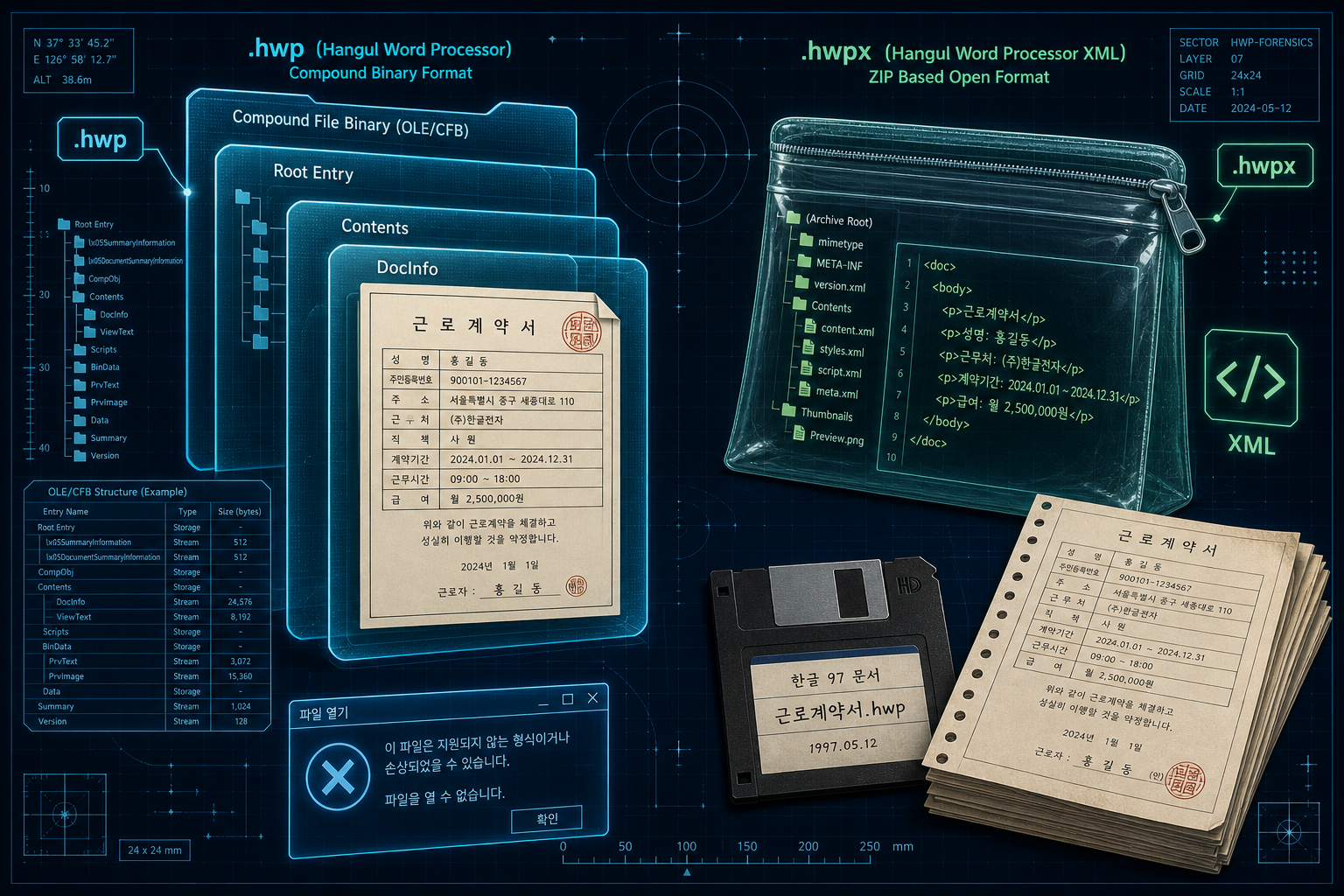
A .hwp file is a Hancom Hangul (한/글) word-processor document from South Korea — not plain Hangul alphabet text, and not .hwpx. Classic .hwp is a Compound File Binary (CFB) / OLE package (same container family as legacy Microsoft .doc). .hwpx is a ZIP of XML under Open Word-Processor Markup Language (OWPML). Current Microsoft Word has no built-in HWP import.
What is a .hwp file?
A legacy .hwp is a document from Hangul Word Processor — the Korean office suite now from Hancom Inc., long known as Hangul and Computer (한글과컴퓨터). The product is officially stylized with the obsolete letter arae-a as ᄒᆞᆫ글, and is also called Arae-A Hangul (아래아한글) or Han/geul (한/글). The *name* comes from the Korean alphabet Hangul. The *file* is a word-processor document: titles, tables, seals, forms — not a UTF-8 text dump of Hangul syllables.
Development started in 1988 among Seoul National University computer-club peers including Lee Chan-jin (이찬진), Kim Hyung-jip (김형집), and Woo Won-sik (우원식). The Encyclopedia of Korean Culture (한국민족문화대백과사전) also names Kim Taek-jin (김택진) among early collaborators. Version 1.0 was completed and sold in April 1989 (Seoul Sewoon arcade sales, per that encyclopedia). The company Hangul and Computer was founded on 9 October 1990 — Hangeul Day — a date widely cited in company and encyclopedia accounts.
Hangul the alphabet vs Hangul the app
If someone says “Hangul file,” they almost never mean a plain-text file of Hangul letters. Outside Korea the legacy file that will not open is the Hancom document — .hwp or .hwpx.
Why won't Microsoft Word open a .hwp file?
Current Microsoft Word does not ship a built-in HWP import filter. Double-clicking a Korean contract, school form, or government attachment on a Windows PC that only has Word usually fails — not because the file is corrupt, but because Word never treated Hangul as a native format the way it once treated a short list of Western converters.
Microsoft Download Center historically offered “Hanword HWP document converter for Microsoft Word” (download id 36772) for Word 2007 (SP2+), 2010, and 2013 (32-bit, with a separate 64-bit build noted). That was an optional add-on for that Office era — not proof that Word “just opens HWP,” and not evidence it works on current Word or Microsoft 365 without a separate install that Microsoft no longer markets as a current feature.
.hwp vs .hwpx — binary package vs ZIP of XML
Classic .hwp in the format 5.x family is a Compound File Binary (CFB) / OLE compound document: a hierarchical mini file system of storages and streams inside one file — the same container family as legacy Microsoft .doc. Hancom’s own technical writing describes CFB with DocInfo and BodyText streams and zlib compression on content streams. File-header recognition often starts from the signature text `HWP Document File`, widely documented from Hancom’s published format notes. Hancom published the HWP binary format specification publicly; Wikipedia cites Hancom’s download announcement of 29 June 2010.
.hwpx is different. It is a ZIP of XML following Open Word-Processor Markup Language (OWPML), Korean Industrial Standard KS X 6101 (enacted 30 December 2011, per Hancom Tech). Peek at the bytes and you often see ZIP magic. Renaming .hwp to .hwpx (or the reverse) does not convert the file — the containers are not the same species.
South Korea’s Ministry of the Interior and Safety moved public On-Nara document systems toward mandatory HWPX (central agencies from 2022; local On-Nara expansion and HWP attachment restrictions have been reported for May 2026). That is why *new* public attachments are shifting to the open ZIP/XML package. Legacy .hwp archives still fill disks from decades when the binary format was the everyday default.
Why Hangul became the default in Korea
Early foreign word processors handled Korean typography poorly. Hangul was built for complete Hangul syllable coverage and for the tables-and-forms culture of Korean offices. It became the default across South Korean government, schools, and business. Hangul 2002 is widely noted (including in Wikipedia’s version list) as used for government e-document systems.
After the IMF period, 1998 brought a crisis: rumors of a foreign sale sparked a public “Hangul salvage” / ᄒᆞᆫ글 살리기 campaign (encyclopedia accounts). The Encyclopedia of Korean Culture has claimed 80%+ domestic word-processor share for the product line — treat that as the encyclopedia’s figure; what matters for legacy files is simpler: for a generation, Hangul *was* the office document in Korea.
Legacy files on disks in 2026
What turns up outside Korea — or on migrated drives inside it — is often an old .hwp: a contract, a school form, a municipal attachment, a zip from an email thread. Word will not open it. A text editor shows binary noise, not Hangul prose. A newer .hwpx may sit beside it; renaming will not bridge them. Public systems are pushing new work toward HWPX, but the binary legacy files remain.
If you have a legacy .hwp, Legacy File Converter can turn it into DOCX or PDF on your own PC. (.hwpx is a later Hancom format; the app does not convert it yet.) For the practical how-to on Windows, see Opening Korean Hangul (.hwp) Files on a Standard PC.
Related reading
Ready to open your old files?
Start free, then unlock unlimited conversions with a one-time $79.95 Standard license. Download the Windows installer — full features for up to 10 files.
Free trial
Full app features · up to 10 files
Windows 10 or 11
Same free trial as always — download the Windows installer and convert locally on your PC.
Direct Windows installer · offline MSI
Is this safe? — publisher, installer, and SmartScreen help
Requires Windows 10 or 11. No subscriptions. 100% Windows Native.